Toast 7 Disc Spanning is Essentially Useless

Well, I should say, "Toast 7 disc spanning is essentially useless to me." Or maybe I should just say, "Toast 7 disc spanning is a big letdown." Why? Because the error handling is piss poor.

Case in point: I recently had the need to burn 60 GB of data to DVD for archival purposes. Within this 60 GB data store there were numerous seriously nested folders — we're talkin' folders upon folders upon folders — so creating 4.2 GB chunks for burning to DVD was going to be a real pain. Maybe a day's worth of work. So I hurriedly ran out and bought my copy (or, actually, got my boss to buy my copy) of Toast 7 as its new disc spanning feature promised to make short work of the lengthy process. I handed the data off to a couple assistants and told them to use the new Toast, and pointed out how easy it would be. They were duly impressed until, on disc 8 of a 15 disc set, the burn failed. The error message cited an inability to read/write data from a particular file on the hard drive. There was little information as to why this was happening. We assumed it was probably a one-time error, or perhaps a permissions problem. So we corrected permissions and tried again, starting from scratch. This was an archive, after all, and we wanted to make sure that we got it right.

This second attempt failed as well. We tried saving the Toast file at the point of failure to see if we could pick up where we left off at a later point in time, but no. Once quit, Toast had no recollection of where it was in the burn.

Next we tried looking at the catalog created by Toast to see if we could figure out what had actually gotten burned and what hadn't, and then start a new burn at the point where the original had failed. It was a difficult process as there were thousands of files, again, in deeply nested folders, and Toast had scattered this data across the set. But it seemed to work reasonably well, until we got to that magic bad file again.

Once again, the burn failed. Same file, same error. After playing around, we discovered that Toast will, on such a failure, attempt to continue with the burn. This is good: if one of your DVDs is bad, you can recover. Just give Toast a new DVD and be on your way. But in our case it was the data on the hard drive that was bad, and from this there was no recovery. I even tried deleting the suspect files and proceeding with the burn, but Toast always insisted that the file was unreadable and kept asking for disc after disc. I had no choice but to cancel the burn and give up, three coasters later, mind you.

I've left out a lot of the little things we tried to get this data burned to DVD with Toast 7, for brevity's sake and because I've forgotten a great deal of them. It's a long and boring tale anyway. But we took numerous stabs at this multi-disc burn, actually. All tolled, it took us three days and we never got a complete disc set of our data. And, in addition to the time spent retrying and troubleshooting the burn, we wasted an ungodly number of DVDs.

As I see it, there are really two points of failure here:

  1. While Toast seems capable of continuing a burn in the case of a bad CD or DVD, it is incapable of doing so when the original data is bad in some way. It seems to me like it would help a lot if Toast either scanned the data for errors before a multi-disc burn, or if it offered the user a way to skip problem files during the burn. Actually, both would be nice, but that's probably hoping too much.
  2. Toast has no memory of where in the multi-disc burn it left off, so if, for some reason, you need to quit the program before all the discs in a set have burned, you'll pretty much have to re-burn the entire set. You can't save that state. This seems particularly short-sighted when you consider the fact that Toast already has a catalog of the data it's burning and what discs that data will be on. Why can't it just allow you to save the multi-disc Toast file between discs and let you pick up where you left off?

For me, the whole appeal of disc spanning is that it allows you to burn a great deal of data (like 50 or 60 GB) without having to slice it up yourself. But Toast 7's inability to handle errors gracefully makes disc spanning across a large number of discs a frightening — and, if there are problems, as in our case, far less practical — prospect than simply breaking the data into DVD-sized chunks yourself and burning the old-fashioned way. It's too bad. I was really jazzed about disc spanning. But until the error handling kinks get worked out, I'm afraid I'm going to have to pass.

Thanks anyway.

UPDATE: According to Roxio, re-burn is a feature of v. 7.0.2 and up: "Disc spanning now prompts to re-burn if a failure or error occurs while burning a single disc," though this is apparently only true if the error happens on the CD or DVD, not if the error is due to bad source data on the hard drive. This issue is also touched on in this very thorough MacInTouch review.

Three Platforms, One Server Part 6: More Windows Quota Problems

Of course I knew it was too good to be true. I've found the first fatal flaw in my plan to unify authentication on the internal network. It goes back to the Windows quotas problem I studied some time ago, and to which I'd thought I'd found a solution.

I won't go into great detail about the problems and various solutions to the Windows roaming profile issue. I've already written plenty on it, and the previous posts outline it all fairly well. I will say that the intended solution was to provide Windows roaming profile quotas by setting them locally on each workstation. But, last week, as we moved forward with the plan, one of my fellow sysadmins, who is far more capable with Windows than I happen to be, pointed out the fact that certain applications (i.e. Photoshop, Maya, etc.) need a certain amount of disk space for temp files and what-not in order to operate. Setting small local quotas effectively keeps these applications from running properly.

We are currently testing a few other scenarios in which quotas for Windows roaming profiles can be implemented to our satisfaction:

  1. The Authentication Server (Mac OS X Server 10.4.6) has a separate volume for Windows roaming profile storage and that drive has quotas enabled (this was the original plan). The drawback to this is that the user's home account data is stored separately for Mac and Linux — which keep this data on the home account server — than for Windows, which would store this data on a reserved volume. The other drawback is the fact that the client machine is not aware of the quotas until the user logs out and the Windows client attempts to upload the new data, at which point Windows issues an error if the user has exceeded his quota. But the user is not warned about quota violations until logout, and this could cause some minor problems.
  2. The Windows Server continues to host roaming profiles and determine quotas for Windows users, but gets user authentication information through a connection to our Mac Authentication Server. The drawback here is that we have to continue using the Windows Server, which we don't really want to do, though it does seem to give us a slightly higher level of control than does the Mac Server. This method is also complicated by the fact that we are currently running Windows Server 2000, which does not include native authentication to LDAP, so third-party solutions would be required. This method could also complicate user creation.
  3. Through some combination of Windows and Mac Servers, we convince the Windows roaming profiles to be situated on the Temp volume of the local workstations, rather than the default location on the "C" drive in the "Documents and Settings" folder, and then set quotas for the Temp volume. I'm skeptical that this is even possible. Windows seems to be hard-coded in ways that make specifying the location of roaming profiles anywhere other than "C:\Documents and Settings" impossible. So this last option seems the least likely to succeed, though if it did it would match the way Mac and Linux behave much more closely. And if we could figure out how to do this without the Windows server, it would be almost ideal.

(Actually, I just thought of a problem with this last method: The Windows Temp drives get erased every Friday. If users happen to be working during the deletion period, what happens to their roaming profiles? The same thing happens on the Mac, but the deletion script on Mac does not delete work owned by the currently logged in user. Can such a scenario be implemented on Windows?)

Most likely we will go with the first solution. We already know that it works. It's a little extra effort when creating new users, but that's totally scriptable. We plan to do user creation from a single script from now on anyway, so these extra few steps, once incorporated into our user creation script, won't really be a big deal at all. The only other problem with this is that our replica will now need to sync the Windows roaming profile volume as well if it's to work as a proper fallback system. This, too, should not be terribly difficult to accomplish. Overall, this solution is less elegant than the original one, but it should be workable. Hopefully, Windows Vista will mitigate a lot of these problems. (Yes, that was totally a joke. Please chuckle softly to yourself and move on.)

I guess what amazes me still is how contrary to other operating systems the Windows OS is. Everything we're doing here can be done the same way on Mac as it can on Linux, or virtually any other *NIX system: home accounts can be read directly from a network disk, their locations can be specified, and therefore, all this quota nonsense is unnecessary. On Windows, roaming profiles apparently must be downloaded to the client machine (an unbelievably stupid requirement), and the location of said profiles apparently must always be on the root drive in the "Documents and Settings" folder. I guess these are the ways in which Windows continues to force people to use Microsoft products (I can almost hear Bill Gates whispering in my ear, "Wouldn't it all be easier if you just used Windows Server?") But for software that's become the dominant standard in both the business and personal markets, Windows sure seems non-standard in baffling and infuriating ways. Though this may be how Microsoft has managed to stay on top all these years, I still, perhaps naively, believe that some day, if they don't change this strategy, it will hurt them. Frankly, though I'm sure they're out there, I don't know a single sysadmin that likes Windows. Can you blame them?

Fix Scrolling Glitch with Embedded Movies in Firefox

Do you use Firefox? Ever scroll a page with an embedded movie and get this?


Firefox Scolling Glitch: Ugly and Annoying
(click for larger view)

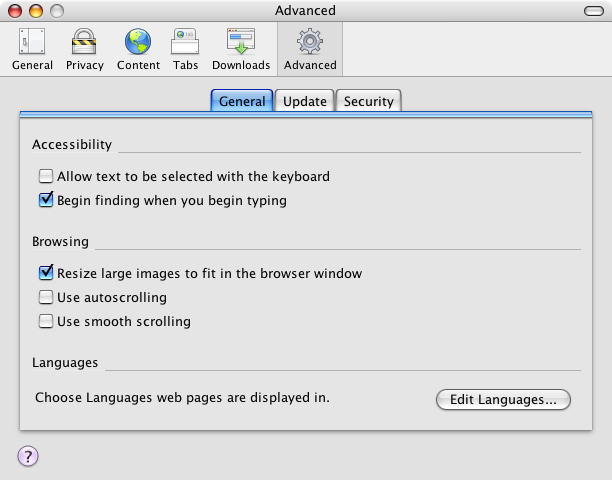
Are you tired of it? Do you want to fix it? I sure did. And I finally figured out how. Seems I'd done a stupid thing and turned on the "Smooth Scrolling" feature. I'm not even sure anymore what this feature does. I think it ramps the speed of your scrolling as you finish the scroll, gradually slowing the scroll down towards the end. It's cute, but hardly necessary. And it's the cause of this annoying behavior with embedded movies. So, want to stop the insanity? Just disable "Smooth Scrolling." You'll be a happy camper.


Smooth Scrolling Prefs: Ahhh! That's Better!
(click for larger view)

Three Platforms, One Server Part 5: Away We Go!

So it's the last week during which students have access to the lab, and that means I can finally implement my plan to unify internal network user authentication. Finally! I'm so jazzed. I've been waiting for months (well, years, really) for the chance to do this, and it's here at last.

The general outline of what I'll be doing over the next few days goes something like this:

  • Backup my current Mac server (for safety)
  • Build my master authentication server
  • Backup a clone of the clean server install
  • Configure the new server with:
    • Users and Groups
    • Home account automounting
    • Home account sharing to SMB (for Windows Roaming Profiles)
    • A skel account for Windows users (to live on the home account server)
    • Other share points
  • Create a replica of the new master server

What I did today:
Well, it's amazing how long a base install of Tiger Server can take. I've pretty much been doing that all day. Not that I'm so incompetent that I can't install the software in seconds flat, but software updates take forever and a day. Planning and getting drives to do all this on was a bit of an effort too. Plus I just wanted to make sure I did it right the first time, so I went slow, gave myself the day. I'm also making clones of everything along the way, for building my replica, and in case I goof and need to start over. So that takes a while. I guess I'm just saying that I'm taking my time with this, 'cause I want it to be as perfect as possible from the get-go.

By Monday we should have:

  • A base install of Tiger Server 10.4.6 with requisite Software Updates on a firewire drive
  • A backup of our old Mac Server
  • A new Tiger 10.4.6 authentication server that's configured to host Mac, Windows and Linux users
  • A replica of same

We will spend part of next week pointing all our workstations at the new server. The Windows machines will be the biggest pain as 1) they are running Windows, and 2) they need local quotas set (which could really be just a subset of point 1, but whatever). The reason for all this quota nonsense, you ask? Well, for the answer, you'll just have to read the previous posts on the matter. Suffice to say, I'm hoping the quota setting nonsense will be the worst part of this job, which it should if all goes according to plan, which, I'm sure you're aware, it rarely does.

Finally, I wanted to mention this quote that I read on Daring Fireball, by someone called John Gall, author of Systemantics, as it really jives with a lot of the stuff I've been thinking about with regards to the lab:

“A complex system that works is invariably found to have evolved from a simple system that worked….A complex system designed from scratch never works and cannot be patched up to make it work. You have to start over, beginning with a working simple system.”
— John Gall

Next week should be interesting. I'll keep you posted.

External Network Unification Part 2: CMS LDAP Connections

So I've been examining what we have, and thinking about what we want, and thinking about how to get there with regards to external network unification.

Here's what we have:

  • A mail server running FreeBSD and getting user info from it's own, local DB
  • A web and FTP server running same, getting user info (I believe) from the mail server
  • A community site running the Mambo CMS, running on the same BSD machine as the web/FTP server, getting its user data from MySQL
  • A custom-built online computer reservations system, also running on the web/FTP server, getting its user data from a second MySQL database
  • A Quicktime Streaming Server running Mac OSX Server, getting user info from the local NetInfo database

Here's what we want:

  • An LDAP server with all user information
  • A mail server running FreeBSD, getting user info from LDAP
  • A web and FTP server running same, getting user info from LDAP
  • A community site running Mambo (or similar) getting user info from LDAP
  • A custom-built (or prefab, if available) online computer reservations system getting user info from LDAP
  • A Quicktime Streaming Server running Mac OSX Server, getting user info from LDAP

Are you sensing a pattern? Did you notice how much easier the second list is to read and understand? Boy I sure did. Extrapolate.

So, porting some of these systems — particularly the BSD machines that rely on local databases of users — shouldn't be too bad: build the LDAP server, point the BSD boxes at it, and, bam! we're done. I'm almost not worried about those. They're standard *NIX boxes, and LDAP support is built in and fairly easy to set up, at least in terms of getting user data. Same with the Quicktime Server: Mac OS X has stupid-simple support for authenticating to LDAP, and there's tons of good documentation on the subject. So I've been concentrating on our web apps, which promise to be much tougher, and recently I had what I think will turn out to be a real breakthrough.

When last I wrote about this topic I was experimenting with setting up my first FreeBSD server, and also with some simple PHP/MySQL-driven web apps that purported to authenticate against LDAP. The one I finally got to work was a freebie called MRBS. MRBS is great. We may even modify it and use it for certain staff-centered scheduling tasks. It's great that it works with LDAP, and it's pretty easy to get set up, after some trial and error and help from AFP548. It's given me a way to go with certain other proposed web-apps in the future. And, most importantly, it's allowed me to demonstrate proof-of-concept. But if MRBS is our future, what about our present?

We have a whole lot of time and effort invested in our current Mambo site. Not so much that it would kill us to move to a new system, but enough so that moving would be painful, and we'd better have a plan and damn good reasons to do so before making the attempt. So for the past however many weeks now, I've been building and testing a multitude of CMS systems. In doing so, I've been primarily concerned with two things: 1) Will this system authenticate to LDAP? 2) Does it have all the functionality (or more) that we currently enjoy on our Mambo site?

I figured the easiest thing to do — and a good place to start — would be to get our current Mambo site to work with LDAP. This would save us the trouble of setting up and learning a whole new system and porting over all our content — again, not the end of the world, but not exactly desirable either. Turns out there is an LDAP hack available for Mambo, but the hack is only supported under older versions of Mambo. I tried installing every version of Mambo I could, and every version of the hack, and every combination of these, as well as hacks to the hack I'd found in forums. No luck. I simply could not get the Mambo LDAP hack to work.

It was at this point I began to turn my attention to other CMSes that might support LDAP. After hunting around I stumbled upon Plone, which looked like a worthy contender, and which supposedly supported LDAP authentication. The thing I liked about Plone from the get-go was that it is ported to Mac OS X, which is what I'm testing all this on, so installation was a breeze. Plone even installs in its own folder in /Applications, and it's here that, somehow, the Plone site root lives. The system itself is very nicely structured as well. The interface is clean and easy to understand, and even fairly easy to modify, in minor cosmetic ways. But getting Plone to authenticate to LDAP turned out to be a little scary and labor intensive for my tastes. Plone runs on Python and MySQL (as opposed to Mambo's PHP/MySQL engine), so Python is responsible for making calls to LDAP. According to the LDAP module READ ME, LDAP authentication in Plone requires the python-ldap module to be installed. Installing this looked to be a pain, and no one in my organization (myself included) knows the first thing about Python, so it was at this point I bailed and began to start thinking about another approach. So much for Plone.

The next system I tried was Drupal. Drupal was also supposed to have LDAP support, though I never got around to really looking into it. I really liked Drupal: It's fast and simple, and the interface is sharp and clean. And Drupal has great user management with support for custom roles and permissions. But Drupal doesn't come with much out of the box, and I never really got around to figuring out how to install additional components. In fact, though I guess you could install one, Drupal does not come with a WYSIWYG HTML editor, which is one of the main reasons we're using a CMS in the first place. So I moved on despite some of the really nice things I saw in Drupal.

Some time later I was talking to a fellow sysadmin about all this, and he said, "What about Joomla?" and I said, "I thought that cost money." and he said, "No, it's the new Mambo." And I thought, "Hmmm... The new Mambo, eh?..."

Needless to say, the next day I'd installed my first Joomla install. I liked what I saw. It has a very similar look and feel to Mambo, particularly on the back-end. In fact, it's almost exactly the same because Joomla is developed by the former developers of Mambo. I'm not (yet) sure what went down, but apparently the bulk of the Mambo team jumped ship and began their own, separate CMS project. So Joomla really is the new Mambo.

Joomla also claimed to support LDAP, and according to their documentation, LDAP would be built in to the next release. This is apparently true, as Joomla 1.1 Alpha includes a built-in LDAP plugin. I installed the Beta and gave it a whirl, but no joy. I couldn't get the Joomla beta to authenticate to LDAP. Reading around some more led me to a new variant of the Mambo LDAP hack that's made to work with the latest stable version of Joomla, version 1.0.8. I also read what I believe was a comment in the Joomla forums from the originator of that hack who swears allegiance to the Joomla team, which probably explains why there are no new versions for Mambo.

Last week I installed Joomla 1.0.8 and the ported LDAP hack for Joomla 1.0.8 and guess what? After weeks of scrounging and searching and hoping and praying and cursing and installing CMS after CMS, it worked!

It fucking god damn worked.

This is great. Not only was installing the hack easy as pie, but setting up the LDAP authentication — for the first time since I dug in on this — was a breeze and worked completely as I'd hoped and expected it to. Not only that, but migrating our Mambo site to Joomla should be a fairly easy task since Joomla is built on the Mambo core. The Joomla site even provides instructions on how to do this, and they don't sound terribly difficult at all. The bonus is that the built-in Joomla LDAP authentication looks promising and, down the line, will hopefully eliminate the need for a "hacked" solution. But until then, the hack works great for our purposes.

This is a huge milestone for the External Network Unification project. Getting our CMS — really, our most complex web application — to work with LDAP was one of my biggest concerns. Going with Joomla gives us the LDAP stuff we need, maintains consistent usability on both the front- and back-ends, makes migrating a whole mess easier, and provides good scalability in terms of development and support for the future. Joomla's developer team appears to be solid, the third-party developer community seems very active, and the LDAP support looks to be headed in the right direction and available in the near term. While it's by no means a done deal, this looks very promising.

Next on the list:

  • Getting our custom computer reservations system to work with LDAP (or finding/building a replacement)
  • Learning and building an LDAP server on FreeBSD (not Mac OSX)

I'm going in. Wish me luck.