I really shouldn't be writing this. I don't have the time.
That's right, intro-net. I'm back. Sort of. I realize I haven't posted anything in a while. I've been exceptionally busy. And I continue to be. But today, luck, fate and timing have conspired to give me a day that looks to be fairly free. So I'm spending my time writing my first post in almost a month.
Lucky you.
It being my first day back and all, I'm a bit rusty and unfocused. So today's post will a running list of odds and ends — things I've noticed, complaints I've had, maybe even some stuff I've been working on, and then a roundup of my thoughts on this year's WWDC. Here goes.
For starters, where have I been? What have I been doing? Well, actually, I've been on vacation. It hasn't been all fun and games though. This year my vacation was spent working on and playing in a performance at Lincoln Center. It was a long and fairly arduous process from which I'm not completely recovered. I had a dream about it just last night, in fact. But it went well, and it's over. So it was worth it. Lincoln Center, baby! How cool is that?
This has left little time for systems work, hence the lack of posts. And now that I'm back on the job, I'm having trouble throwing myself back into the fray. I always kind of lose track of where I was after vacation. And now, with three weeks left before school starts, it's crunch time. Still, somehow, today I'm the only one here. Everyone else is either sick or off. It's weird.
There were a couple things I stumbled on over the past few weeks. Really little, tiny things but maybe worth a mention. First, the final word, in my opinion, on the whole Repair Permissions saga has just come down from MacWorld. It's fairly pro-repair — or at least not anti-repair — yet Gruber seems pleased. Go figure. It's a very clearly written piece that really demystifies the whole process, and at least to mind, says everything that needs to be said. Read it and then put it out of your mind. Finally.
Second, I discovered a neat little trick in Firefox: Pressing the control button while scrolling with the scroll wheel on your mouse activates forward- and back-page. Control+scroll-up will go back, and control+scroll-down goes forward. Seems backwards to me, but it's still kind of a cool trick. No, wait, you're right... It's dumb...
Finally, I wanted to talk a little bit about the announcements made at this year's WWDC. Overall, I'm a bit underwhelmed, I must admit. Maybe I'm somewhat jaded after all these years of WWDC announcements. Or maybe I really wanted there to be far, far more attention on the Finder. There was none in fact, which only leads me to believe — hope, at least — that improvements to the Finder are in the pipe, and that they were among the "Top Secret" features Steve Jobs mentioned in his presentation of Leopard.
The new Mac Pros look incredibly sweet. But then, each iteration of the pro Mac line looks exponentially sweeter, so I'm not floored. Plus, my now aging PowerMac dual G5 still feels like plenty of computer for anything I need to do. It handles it all without complaint and still feels fast. Underscoring my lack of enthusiasm, Apple now tends to release new pro hardware right after I buy my new Macs for the lab. This is fine, actually. I kind of like to stay just short of the bleeding edge here, preferring stability to speed and novelty. Getting a known quantity (we bought Quad G5s) just makes everyone's life easier. But It's hard to get excited about new hardware when you don't need any. Also, Apple has really been focused on the Intel transition, I think, so we're not really seeing many (any?) new products. Mostly what's been announced lately — and this year's WWDC is no exception — has been product revisions and speed bumps. Fine ones to be sure, but not exactly what I'd call exciting, and nothing that will change my life any time soon. *Yawn*
Some other things I noticed while watching the WWDC keynote:
Phil Schiller said, "Our [Intel] transition is complete." While Apple's transition may be complete, the transition for users is not. Apple is right to be proud of this amazingly swift transition to Intel chips. They're unbelievably good at this sort of thing, and it's one of the aspects of the company that keeps it fresh and alive and constantly moving forward. But make no mistake: the transition for users is still in progress. Many major applications are still PPC-only and must run in Rosetta, negating many of the advantages of buying new, Intel-based hardware for the near-term. And the OS is not yet Universal. This means that, in many ways, we're dealing with two separate platforms when we mix PPC and Intel Macs. Each platform must have a different OS and applications. In a lab setting this complicates matters a great deal. So, I think for users and lab admins the transition is just getting started. Once all apps are Universal and the Universal Leopard is out, then we can start to call this thing done. But as it stands, there is still a lot of work ahead.
Along these lines, as yet there has been no Intel-compatible version of Mac OS X Server. But I noticed that you can configure your new Mac Pro with Server — and the new Intel Xserves surely come with it — so apparently the Intel version exists. Where is this software? Are there two separate versions — a PPC and an Intel one, as with client — or is it Universal? The answer appears to lie at the Apple Store. Clicking "Buy Now" on the OS X Server page takes me to the store (I can't seem to get there from the Apple Store directly) where it's revealed that Mac OS X Server 10.4 is a Universal application. I'm not sure when this happened (did I miss it somehow?), but something tells me my old copy of Server won't be running on my new Intel Mac mini. I wonder if there's an upgrade path to the Universal version?
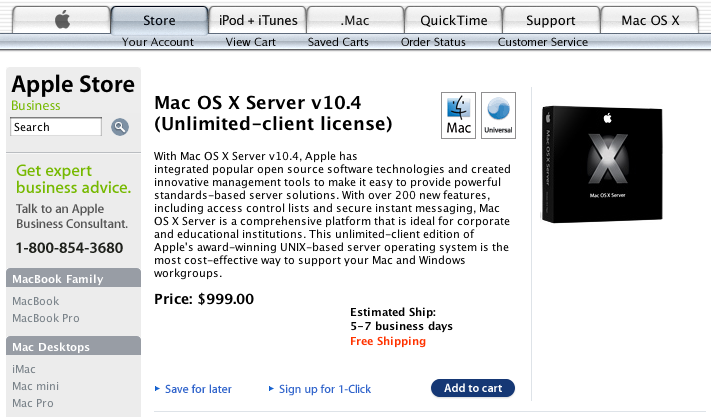
Mac OS X Server 10.4: Universal? Really? Since When?
(click image for larger view)
Another thing that struck me this summer is the fact that this is the first year I don't have to upgrade my lab systems. Sure, I'm running Software Update and updating various apps. But there is no new version of the OS, and there won't be for a while. This, as it turns out, is a godsend. With my promotion, and all the various new responsibilities and projects it entails, the last thing I need to be doing right now is testing a new — and, let's face it, probably buggy — Mac OS, and worrying about implementing it before summer's end. I have to say, the slowdown of new Apple OS releases couldn't have come at a better time for me.
The one thing that really did get to me this year was Time Machine. Time Machine looks amazing. It looks like magic. It looks like... Well, it kind of looks like a toy, actually. It's almost deceptive how childlike Apple has made some thing that, for many users, is an essential yet often vexing task. While I think the UI for Time Machine is ultra-cheesy (though no less so than Dashboard), I also think it's immediately and intuitively understandable. And for something like backups, that's no small feat. It may be somewhat garish-looking, but I think it's about twelve billion times more attractive and user-friendly than something like Retrospect. It's a look I could learn to love for it's personality. Here's hoping it works as well as it appeared to in the the presentation. No one but Apple could make backups so intuitive, so appealing and so fun. Yes, fun. Makes me almost want to lose some documents.

(click image for larger view)
And speaking of cheesy graphics, Core Animation looks great. I've little doubt that Core Animation will be used to great success. I've also little doubt it will be abused by bad UI designers. Can I just say? Brace yourselves for the cheese.
Spaces also looks cool. I've never been a big virtual desktops kind of guy. But once it's baked into the OS, I may end up taking advantage of it after all. It looks like Apple's done a great job with it. One thing: Some folks are complaining that Apple tends to steal existing ideas from small software developers and put them in OS revisions. I don't really think this is always fair. Here's how I see it: Apple puts out the OS. Things — like, oh, I don't know, Finder labels, for instance — are missing. In the interim, some enterprising software developer comes along to fill the void with a program that brings labels to the Finder. The people are happy. In the next OS release, Apple then adds labels to the Finder, thus effectively ending the need for the third-party solution. Suddenly people are accusing Apple of stealing the idea and putting developers out of business. But the fact is, Apple had labels in Mac OS 9, which is why people wanted them in the first place. If anyone stole the idea, it was the developer who implemented the third-party label solution. But the fact is, no one stole anything. These ideas — Finder labels, tabbed chats, virtual desktops — are out there already. Software developers know this. They know it's risky to develop apps that could someday be implemented by Apple themselves. In fact, unless you're idea is fairly original — i.e. not a web page creation tool, not system modification, not a browser — you should expect some competition. Whether that competition comes from Apple or another third-party developer makes little difference in my book. Spaces is just Apple's implementation of an idea that's been around for a very long time.
The vague demonstration of Spotlight's new features has me worried, as I always am when it comes to Spotlight. The big new feature of Spotlight (well, aside from the boolean functionality, which is great) is it's ability to search network drives. Yes, this worries me immensely. One of Spotlight's biggest issues, in my book, is the problems it has returning relevant results. When Spotlight searches my huge store of files and folders, the results I get are usually not very useful. There's just too much stuff there, and its relevance is determined — well, I don't know how it's determined, but it doesn't seem to be very accurate for most of my needs. I have chalked this up to the fact that I have a very large amount of data. Users with less data seem to like Spotlight more than I do. So my worry is, what happens when you add to this already burgeoning local data, the data of all the machines on your LAN, which in my case is about 30 Macs? Surely the boolean functions will help aggregate more sensible results, but I worry that the accuracy and speed gains of the new version will be negated by all that extra data. What I was really hoping for from Spotlight was more ways to customize and configure the app. It's possible that wish will still come true. I hope it does.
Finally, one other thing I noticed in the keynote speech. It's something I've noticed in previous keynotes, actually. Steve Jobs, at least when he's onstage, always uses point-and-click to navigate the Mac. He always uses the mouse. Now I can say with a fair degree confidence that I'm a power user. That is, I know a great number of keyboard shortcuts, and I tend to use the keyboard for as much navigation as I can. I would guess Jobs is, like, the uber-power user. And yet he always uses the mouse for presentations. You never see him use a keyboard shortcut. Never. And I just wonder why. I assume it's for presentation's sake. I assume it's to show the average, mouse-encumered user how to do things. I assume it's also just more visually interesting. But who knows? Maybe Jobs is just a freakishly prodigious mouse user.

Steve Jobs: King of the Mouse
(click image for larger view)
Anyway, as I said at the top, we're in crunch mode here, getting ready for the return of students to the lab. I'll post when I can, but expect things to be lean here for a bit longer as I actually try to do some real work.
UPDATE 1:
I've found some more information on Mac OS X Server for Intel hardware. Seems if you want to run Server on your Intel Mac you need to buy the latest, shrink-wrapped, 10.4.7 version from Apple. That version is Universal. Previous versions are not. As far as I can tell, there is no upgrade path.
UPDATE 2:
A fellow blogger tells me that the coolest stuff in Leopard is the stuff not mentioned in the WWDC keynote. This is being confirmed by other reports. I'm a bit baffled by Apple's decision not to include this stuff in the keynote. Did they think it was too low-profile? Not consumer-friendly enough? I thought this conference was for developers. And I'm not the only one who seems as, if not more, impressed by some of the unannounced features than the announced ones. Makes me really wish I had the time to attend WWDC, but it'd be a hard sell to the bosses, I can t
ell you. The timing is just terrible. Oh well.