Networked Home Accounts and The New RAID

We recently installed in our machine room a brand-spankin' new RAID for hosting network home accounts. We bought this RAID as a replacement for our aging, and horrendously unreliable Panasas RAID. The Panasas was a disaster for almost the entire three-year span of its lease. It used a proprietary operating system based on some flavor of *NIX (which I can't recall right at this moment), but that had all sorts of variations from a typical *NIX install that made using it as a home account server far more difficult than it ever should have been. To be fair, it was never really intended for such a use, but was rather created as a file server cluster for Linux workstations that can be easily managed directly from a web browser, as opposed to the command-line. It was really built for speed, not stability, and it was really completely the wrong product for us. (And for the record, I had nothing to do with its purchase, in case you're wondering.)

What the Panasas was, however, was instructive. For three years we lived under the shadow of its constant crashing, the near-weekly tcp dumps and help requests to the company, and angry users fed up with a system that occasionally caused them to lose data, and frequently caused their machines to lock up for the duration of a Panasas reboot, which could be up to twenty minutes. It was not fun, but I learned a lot from it, and it enabled me to make some very serious decisions.

My recent promotion to Senior Systems Administrator came just prior to the end of our Panasas lease term. This put me in the position of both purchasing a new home account server, and of deciding the fate of networked home accounts in the lab.

If I'd learned anything from the experience with the Panasas it was this: A home account server must be, above all else, stable. Every computer that relies on centralized storage for home account serving is completely and utterly dependent on that server. If that server goes down, your lab, in essence, goes down. When this starts happening a lot, people begin to lose faith in a lot of things. First and foremost, they lose faith in the server and stop using it, making your big, expensive network RAID a big, expensive waste of money. Secondly, they lose faith in the system you've set up, which makes sense because it doesn't work reliably, and they stop using it, favoring instead whatever contingency plan you've set up for the times when the server goes down. In our case, we set up a local user account for people to log into when the home account server was down. Things got so bad for a while that people began to log in using this local account more than they would their home accounts, thus negating all our efforts at centralizing home account data storage. Lastly, people begin to lose faith in your abilities as a systems administrator and lab manager. Your reputation suffers, and that makes it harder to get things done — even improvements. So, stability. Centralization of a key resource is risky, in that if that resource fails, everything else fails with it. Stability of crucial, centralized storage was key if any kind of network home account scenario was going to work.

The other thing I began to assess was the whole idea of networked home accounts themselves. I don't know how many labs use networked home accounts. I suspect there are quite a few, but there are also probably a lot of labs that don't. I know I've read about a lot of places that prefer local accounts that are not customized and that revert to some default state at every log in/out. Though I personally really like the convenience of customized network home accounts that follow you from computer to computer throughout a facility, it certainly provides a fair amount of hassle and risk. When it works it's great, but when it doesn't work, it's really bad. So I really began to question the whole idea. Is this something we really needed or wanted to continue to provide?

My ultimate decision was intimately linked to the stability of the home account server. From everything I've seen, networked home accounts can and do work extremely well when the centralized storage on which they reside is stable and reliable. And there is value to this. I talked to people in the lab. By and large, from what I could glean from my very rudimentary and unscientific conversations with users, people really like having network home accounts when they work properly. When given the choice between a generic local account or their personalized network account, even after all the headaches, they still ultimately prefer the networked account. So it behooves us to really try to make it work and work well. And, again, everything I saw told me that what this really required, more than anything else, was a good, solid, robust and reliable home account server.

So, that's what we tried our best to get. The new unit is built and configured by a company called Western Scientific, which was recommended to me by a friend. It's called the Fusion SA. It's a 24-bay storage server running Linux Fedora Core 5. We've populated 16 of the bays with 500GB drives and configured them at RAID level 5, giving us, when all is said and done, about 7TB of networked storage with room to grow in the additional bays should we ever want to do so. The unit also features a Quad-port GigE PCIX card which we can trunc for speedy network access. It's big and it's fast. But what's most important is its stability.

Our new RAID came a little later than we'd hoped, so we weren't able to test it before going live with it. Ideally, we would have gotten the unit mid-summer and tested it in the lab while maintaining our previous system as a fall-back. What happened instead was that we got the unit in about the second week of the semester, and outside circumstances eventually necessitated switching to the new RAID sans testing. It was a little scary. Here we were in the third week of school switching over to a brand new but largely untested home account server. It was at this point in time that I decided, if this thing didn't work — if it wasn't stable and reliable — networked home accounts would become a thing of the past.

So with a little bit of fancy footwork we made the ol' switcheroo, and it went so smoothly our users barely noticed anything had happened. Installing the unit was really a simple matter of getting it in the rack, and then configuring the network settings and the RAID. This was exceptionally quick and easy, thanks in large measure to the fact that Western Scientific configured the OS for us at the factory, and also to the fact that they tested the unit for defects prior to shipping it to us. In fact, our unit was late because they had discovered a flaw in the original unit they had planned to ship. Perfect! If that's the case, I'm glad it was late. This is exactly what we want from a company that provides us with our crucial home account storage. If the server itself was as reliable as the company was diligent, we most like had a winner on our hands. So, how has it been?

It's been several weeks now, and the new home account server has been up, without fail or issue, the entire time. So far our new home account server has been extremely stable (so much so that I almost forget about it, until, of course, I walk past our server room and stop to dreamily look upon its bright blue drive activity lights dutifully flickering away without pause). And if it stays that way, user confidence should return to the lab and to the whole idea of networked home accounts in fairly short order. In fact, it seems like it already has to a great extent. I couldn't be happier. And the users?... Well, they don't even notice the difference. That's the cruel irony of this business: When things break, you never hear the end of it, but when things work properly, you don't hear a peep. You can almost gauge the success or failure of a system by how much you hear about it from users. It's the ultimate in "n o news is good news." The quieter the better.

And 'round these parts of late, it's been pin-drop quiet.

More Blogger Beta Coolness

There are a couple more new and improved features of Google's Blogger Beta, which this blog now uses, that I just wanted to mention because they're really quite cool.

The first new feature is the "Search This Blog" feature. This has been around since I've been using Blogger, so it's not really new per se, but its implementation is. The search field can be found at the top of every page of every Blogger blog. In the past it used Google's Blog Search, which is both currently in beta, and currently seriously broken, which is big reason I've switched to Blogger Beta. But now it seems to use some kind of internal search magic. Now when you use it you're no longer transferred to a Google Blog Search page, but instead get the search results right from within the blog itself. This is brilliant and beautiful, and it's the way it should be.


Blogger: Search This Blog
(click image for larger view)

The second very new feature (like, as of maybe last week) is a back-end deal, but it's incredibly useful to authors. In the Post Manger you get a list of all your posts, ordered by date. But now, for the first time, you have some options for viewing this list. Of particular interest to me is the ability to view posts by Label. Blogger has not only leveraged their new Label feature in the front-end, but very smartly in the back-end, and it's just one more pleasant surprise that's making my blogging life that much easier, and encouraging me to stick with the Blogger system.

I have to say, there's nothing quite as impressive as a beta that works significantly better than its stable counterpart. I've had no troubles and gobs of joy from this Blogger Beta. Of course, now that I've said that out loud I should expect everything on the site to go instantly and irretrievably wonky. But until then, my hat's off to the development team for Blogger Beta. You guys are kicking some serious ass. Thanks!

Adobe Legal Hosed My System

So recently there's been a bug in, according to Adobe anyway, Mac OS X that causes certain files in certain Adobe CS2 applications to wreak untold havoc on HFS+ filesystems. In a fairly recent Adobe Support Knowledgebase article on this issue Adobe says, and I quote:

Background information

Mac OS X causes illegal file names to be reported when it reads some of the font data used in the Vietnamese End User License Agreements, which are installed in the Legal or Legal.localized folders. This problem causes severe file system and hard disk corruption if the files are not deleted or if the file system is not repaired.

Apple fixed this problem in Mac OS X 10.4.7.

The fix for this, Adobe goes on to say, is to get rid of any folder in any Adobe CS2 application folder called "Legal" (in the Finder) or "Legal.localized" (in the Terminal), and then run Disk Utility to repair the disk. They also suggest that upgrading to Tiger 10.4.7 or later is a good last step as it halts the corruption process.

I'd actually had the problem last summer on my lab systems, which had exhibited evidence of it during a clone operation. Any clone of a system would fail, and the asr command would actually report the name of the trouble file. Indeed, running Disk Utility's "Repair Disk" (or in our case, fsck from single-user mode) would fix the problem and our clones would subsequently succeed. Those systems were running 10.4.7.

My office system, on the other hand, never went through the cloning process, so I never detected the problem. But I seem to have been bitten by this bug and in a bad way. Please note the last sentence in the above quote:

This problem causes severe file system and hard disk corruption if the files are not deleted or if the file system is not repaired.

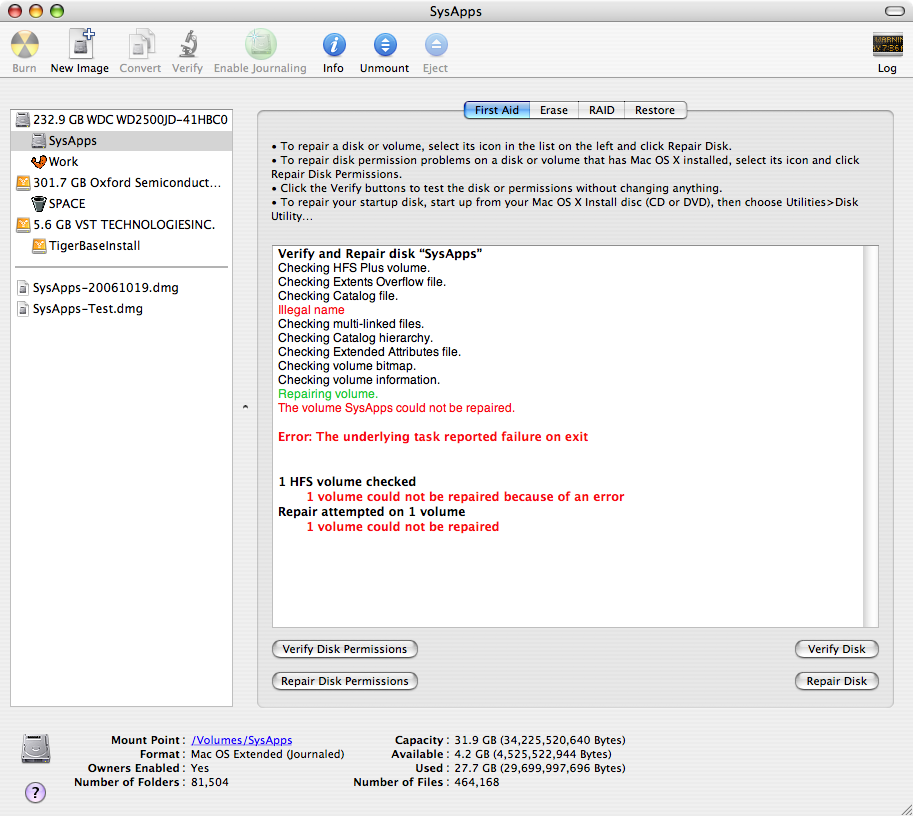
Yesterday I was running Disk Utility on a problem drive and decided to run it on my system partition as well, for good measure. This was the output:

Disk Utility: Reports Unfixable "Illegal name"
(click image for larger view)

See that "Illegal name" error in bright red? That's a telltale sign that you've got the "Adobe Legal bug" (as I like to call it). It's also, I can tell you from cold, hard, agonizing experience, a telltale sign that you are indeed fucked. Hard. I think this is what Adobe is referring to as "severe file system and hard disk corruption." I tried everything to make that "Illegal name" error go away. Actually, attempts to fix the problem took more time than it took for me to rebuild my system, which is what I ultimately had to do. Now I hate rebuilding systems. Almost as much as poking myself in the eye with white hot forks. So I spent the better part of the day attempting to fix the problem.

The first thing I did was to boot into a good system partition. I just happened to have a base Tiger OS installed on a firewire drive, so I booted into that. I then went through the aforementioned Disk Utility and fsck routines. (I also tried Disk Utility from the Tiger DVD, just to be thorough.) No luck. I always got the "Illegal name" error. I also tried fsck with some options to see if I could actually track down the file with the illegal name and delete it. Running:

sudo fsck_hfs -frd /dev/disk0s10

Produced the following output:

** /dev/rdisk0s10** Checking HFS Plus volume.** Checking Extents Overflow file.** Checking Catalog file.** Rebuilding Catalog B-tree.hfs_UNswap_BTNode: invalid node height (1)** Rechecking volume.** Checking HFS Plus volume.** Checking Extents Overflow file.** Checking Catalog file.Illegal nameillegal name is 0x00 54 00 69 00 65 03 02 03 01 00 6E 00 67 00 20 00 56 00 69 00 65 03 02 03 23 00 74 00 2E 00 68 00 74 00 6D 00 6Creplacement name is 0x00 54 00 69 00 65 03 02 03 01 00 6E 00 67 00 20 00 56 00 69 00 65 03 23 03 02 00 74 00 2E 00 68 00 74 00 6D 00 6C** Checking multi-linked files.** Checking Catalog hierarchy.** Checking Extended Attributes file.** Checking volume bitmap.** Checking volume information.Verify Status: VIStat = 0x0000, ABTStat = 0x0000 EBTStat = 0x0000        CBTStat = 0x0000 CatStat = 0x8000** Repairing volume.replacement name already existsduplicate name is 0x00 54 00 69 00 65 03 02 03 01 00 6E 00 67 00 20 00 56 00 69 00 65 03 23 03 02 00 74 00 2E 00 68 00 74 00 6D 00 6CFixIllegalNames - repair failed for type 0x23B 571** The volume SysApps could not be repaired.volume type is pure HFS+primary MDB is at block 0 0x00alternate MDB is at block 0 0x00primary VHB is at block 2 0x02alternate VHB is at block 66846718 0x3fbfffesector size = 512 0x200VolumeObject flags = 0x07total sectors for volume = 66846720 0x3fc0000total sectors for embedded volume = 0 0x00


This seemed to suggest that, yes, there is an illegally named file somewhere, but that it can't be replaced because the replacement name already exists. Ew! I'm not sure what that means, but it does not sound good.

Undaunted (alright, maybe a little daunted), I decided to try cloning the system to see if I could get the name of the illegal file like I did last summer, using the asr command. I also thought it was possible that any filesystem damage, depending on the nature of that damage, might be repaired by cloning the system to a clean, undamaged filesystem. So I created a 40GB disk image, which actually took quite some time, probably because I was booted from a slow firewire drive. But it finally completed, and once it did I cloned my sick system partition to it. This also took a great deal of time over firewire. Like hours, actually. Like I actually had a good excuse to go to lunch for once. But it did finish successfully, and it never reported an illegal name in the process of cloning. So I ran Disk Utility on it, hoping that maybe the new filesystem did the trick. No such luck. Same error.

By this time I'd spent — wasted, actually — an entire day on this problem. A problem apparently caused by "font data" robbed me of an entire day of productive work and put me in a nasty mood to boot. My options spent, I did the thing I hate to do so very much: I rebuilt.

There is at least one silver lining to all this, and that is the magic of disk partitions. You see, it's for reasons just such as these that I partition my user data from my system and application data. Every Mac system I build has a partition called SysApps — that houses the system components and applications — and one called Work — that houses all the data I generate, from home account preferences to Final Cut files. In the above scenari o it was the SysApps partition that was corrupted, but the Work partition checked out just fine. This two-partition method offers numerous advantages in such a scenario. For one, after booting into the firewire drive it was a simple matter of telling NetInfo Manager to use my home account on the Work partition and I was right back to work checking email and the like, which is pretty crucial for me to be able to do. All my setups and preferences worked normally, my browser bookmarks were all there, my calendars were all intact, and I could at least work on actual work instead of being stopped dead in my tracks by this corruption problem. Secondly, in this case reformatting the SysApps partition was necessary. Had all my data been on that partition I would have had to back it all up somehow. And what if that corruption lay somewhere among my user data? I'm not sure what I would have done then. I may just have been screwed. But because my data was walled off, it was a non-issue. Thirdly, my Work data takes up the majority of the data on my system, and it's quite large — about 170GB. In a single-partition system I'd have had to blow all that away and restore it somehow. Backing up and restoring 170GBs of data takes a long time and would have significantly increased the amount of time I spent getting back on my feet. With my two-partition system, about 30GB was all I had to worry about. And all that cloning I did in the hopes of finding a fix? With my 30GB SysApps partition it was painful and time-consuming, but it was doable (though whether it was worthwhile is debatable). If I'd had to do that with 200GB of system, application and user data combined it would have been downright impossible.

Restoring the SysApps partition was a pain, to be sure. But there was nothing there that didn't already exist somewhere among the myriad software installation discs in my office, so it wasn't so bad. And there was a lot of stuff I could restore right from the backup I'd made with asr — things like drag-n-drop applications, crontab and host files, and the like. Troubleshooting the problem took about a day, but rebuilding the system took a few short hours, in part because most of my preferences reside in my perfectly preserved home account. It was mostly just a matter of cloning a working system (from my base Tiger install on my firewire drive), reinstalling a few broken applications (Final Cut, Adobe stuff, etc.), and running Software Update as needed. Along the way I checked the health of my SysApps drive, and no "Illegal name" errors were reported. Phew!

So that's the saga of how Adobe Legal hosed my hard drive. I'm not sure if the blame really lies with Apple or Adobe. What I do know is that I'm sticking with my two-partition system, and I'm permanently deleting all those "Legal" folders associated with Adobe products. I suggest you follow this latter step yourselves, 'cause, if left untreated, it's true what they say: It really can cause severe filesystem and hard disk corruption. I'm living proof.

Apple's Response to the iPod Virus was Tacky

Period. And here's why: Anytime someone screws up and even makes the tiniest attempt to try and shift the blame, it's tacky. It's poor sportsmanship. It's poor form. Since everyone is spouting analogies, here's mine: Let's say I throw you a can of Coke. You know, you're thirsty, and I go, "Here's a can of Coke," and I throw it to you. But you're not ready. You're not expecting that can of Coke to be flying across the room at you, and you miss it. You miss the catch, and you get conked on the head by my flying can of Coke. Now, if my response is, "Dude, I'm so sorry I hit you in the head with that can of Coke," that's appropriate. We'll probably remain friends, you and I. But, if I say something like, "Sorry I hit you on the head with that can of Coke, but you really should have caught it," well now, that's just plain old tacky. And you're probably going to remember that, and it will probably fester in your mind, perhaps for some years, until it finally comes out in some fit of rage that ultimately ends our friendship. 'Cause, basically, I'm an asshole for saying that, and I probably said a whole lot more stuff like that, and by now you probably have every reason to hate me. But I digress.

The point in time when you royally screw up — like Apple did by releasing iPods with viruses on them — is not ever a point in time when you want to be pointing out someone else's flaws. I don't know what it is about the social human mind that recoils at such behavior. It just does. And that's why most of us think Apple's response to their screw-up was just plain... Uh... Right, tacky!

Maybe they need to release another press release that says, "We're sorry we screwed up, and we're also sorry we tried to shift the blame." A-la, "I'm sorry I hit you with that Coke, and I'm sorry I tried to blame you for it after." That might help. Might.