Firefox Rocks!

Holy Sweet Bejeezus!

In my recent browser review, I gave the latest Firefox release (which has since gone to 1.5b2) the praise it deserves. It's really gotten quite nice. It's speedy, it looks great, and -- it's main selling point -- it does everything you could ever want a browser to do. My one real complaint was the key-commands, particularly for switching between tabs. It seemed to have reverted to an earlier version -- "control-page up" -- which is both a clumsy two-handed key-command, and which requires a whole different set of keystrokes on a Powerbook, and so is quite worthless as a key-command, which is supposed to be easy to use and to remember.

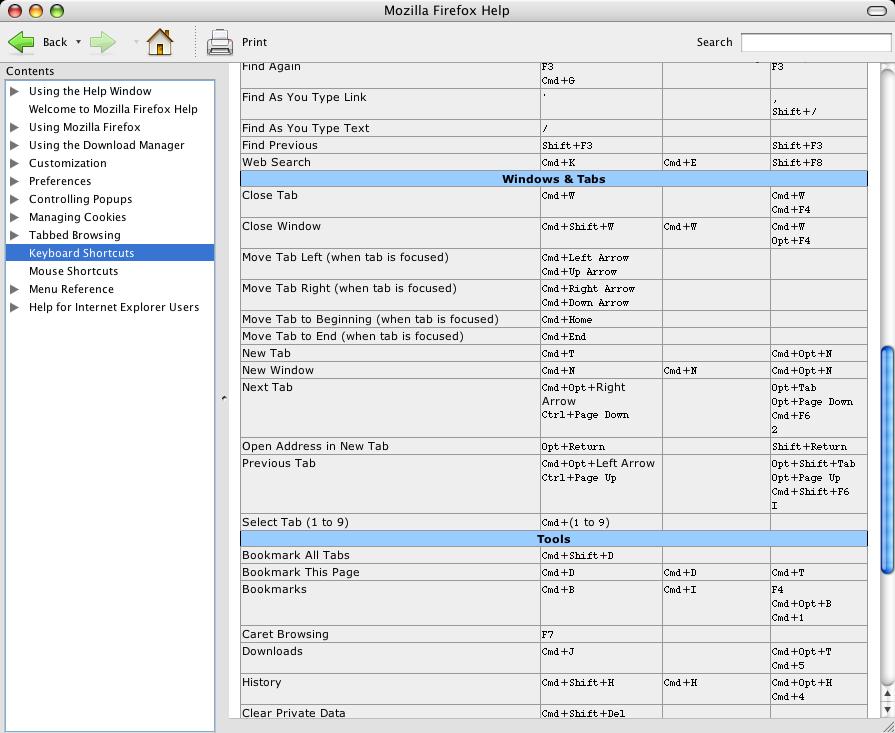
After the review, a reader, pablo7, suggested I investigate extensions for Firefox, particularly one called keyconfig, which is meant to allow user control over key-commands. Well, I appreciate the tip, and I finally got around to looking at keyconfig, and, unfortunately, it would not install because of a "download error." Still, this spurred me on to investigate the matter further, and I ended up checking the "Firefox Help" pages from the application's Help menu (which, by the way, look great, and are actually, as we'll see, quite helpful indeed). Lo and behold, not only are there additional key-commands for tab switching, there's actually a quite sensible one: "command-option-arrow." Same as Camino.

Firefox's Help Menu Actually Helpful
(click for larger view)

I'm actually almost positive I tried this combo before writing my review (though maybe I didn't), so it may be new to version 1.5b2. But it may also ultimately be the straw that breaks the camel's back in this case. I've been increasingly fed up with Safari, and increasingly pleased with Firefox . And this beta's been rock-solid in my tests, and much more useful when logging on to web-based accounts. I even keep finding other great features: arrange-able tabs, the ability to bookmark tab groups, very configurable popup blocking, and it will even import Safari's bookmarks, cookies, history and preferences. Oh, baby! That's what I like.

So, I'll say again: Holy Sweet Bajeezus! I may be switching to Firefox. Like, soon.

Safari, this is your last warning.

UPDATE 1:
Here's the best Safari-like theme I've seen for Firefox, and it works in the latest beta.

Also, a decent read on some of the cool things you can do with Firefox. Though it pertains to the non-beta version (and redundantly mentions tabs first off, as if other browsers lack this feature, or like any Mac user is still using IE), much of this will work in the beta, or will work when v.1.5 comes out of beta. And really, it's just an overview. This is the most freely configurable browser out there.

People Who Send Spam Are Assholes...

...And we pay for it.

Sorry to do this, kids, but I get enough spam in my regular email accounts to really, really hate it and have a serious need to keep it down as much as possible. (Don't we all?) So I'm turning on Word Verification. It seems like the least intrusive method for curtailing the ever-rising collection of unwanted email in my inbox. If you're as annoyed by this as I am, find a spammer and tell them to fuck themselves, or, if you're so inclined, commit other acts of violence, verbal or otherwise, upon them.

Thanks for understanding.

-systemsboy

Latest Tiger Annoyances or: Where is v.10.4.3?

Tiger has caused me no end of headaches. From the home account problems in the lab, to the bugs in the Finder, Spotlight problems, and overall system wonkiness. Here are just a few more little problems I've noticed. And while I can see why 10.4.3 is taking so long, the wait is killing me. And if it doesn't fix a majority of the problems, I'm gonna... I'll just... Well, I'll be bummed, that's what. And more than a little aggravated.

1. Safari window position: This bug is so irritating, I continue to mention it, even though I know it's not likely high on the Apple priority list. If it's not fixed in 10.4.3, I'm switching to Firefox. Hell or high water.
2. Caching problems: Tiger has some serious problems with cache. It gets corrupted a lot, and then you're screwed until you manually delete it.
3. Help crashes: I almost can't open Help without it crashing, particularly if I'm doing a search. Also, sometimes the searches bring up nothing (not "No Results Found," but literally nothing -- no change in the window). Some of this is cache related. Seems almost every time I run Help, I have to empty its cache. Not helpful.
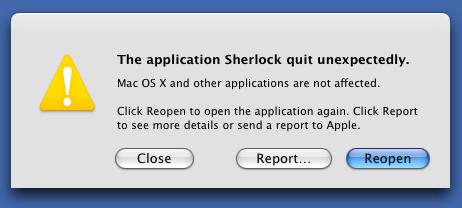
4. Sherlock UI glitches, cache corruption and crashing: That pretty much says it all. Sherlock will, on occasion, refuse to update the UI, showing me, basically, an empty window, and then crashing. Again, clearing the cache is the fix.
5. System sounds just stop working: So do Mail sounds. Don't know why. All I know is, my Inbox is suddenly full and I'm none the wiser. And when I empty the trash there's no crunching sound, which could be a good thing. But still... WTF?

Good God! Sherlock Crashes Again!
(click for larger view)

Every day I get a little more irritated with Tiger. And every day I'm taunted by the rumor sites with intimations that v.10.4.3 is right around the corner. This has been going on for months now. I don't think I've ever waited longer or with more bated breath for an update than I have for this one. The scary thing is that, with all the major bugs that exist in Tiger, it's unlikely that these minor ones will be addressed, and even less likely that improvements to new Tiger-specific technologies like Spotlight will be added in this release. We're waiting quite a long time here for some pretty basic functionality. Can we ever expect to see additions or improvements to Spotlight or Automator? Well, they did it with Dashboard and 10.4.2, so you never know. But if I hold my breath until 10.4.3 gets here, I'll surely be dead for the release.

UPDATE:
Add to the list, Tiger keeps changing my "Font smoothing style:" (under the Appearance Preference Pane) from "Standard - best for CRT" (which I prefer even on an LCD) to "Automatic - best for main display." Real problems with settings sticking. Don't know why.

Apple's Latest Product Announcements

I must admit, this week's announcement of new Apple products really got me thinking. There was a lot there that I couldn't really conceive of until I finally saw it implemented: online TV distribution, The Digital Hub, and the Video iPod at last. This was almost more of a conceptual and marketing breakthrough than a technological one for Apple, and it's really interesting for me to see how they're starting, gradually, to implement these concepts. I just want to talk fairly briefly about my thoughts on some of the main ideas brought to light last week.

The first thing that struck me is that Apple is the best thing to ever happen to U2. That band is so lucky ol' Steve apparently has a hard-on for them. I mean, does an iPod announcement take place that doesn't prominently feature these has-beens? Has U2 written anything interesting in the last decade? I think the band is getting a lot more out of this deal than Apple at this point. But this is just a snarky aside.

Next, I think Apple has really nailed, or is very close to nailing, the online content delivery thing. They proved themselves with music, and now other media want in. Big time. And Apple is not only happy to provide, but I think they do a hell of a job. In some ways, Apple has become the intermediary in the ever-hostile relationship between producers and consumers. They make all that ugliness pretty, and not just on an aesthetic level. The pricing scheme vs. quality of the downloadable TV shows is about as perfect as I can imagine. I find myself wanting to download shows I've already watched and have on tape, just because I can, and because they're cheap. Seems like a great deal. And if I ever miss an episode of Lost, I'll be checking iTunes long before I ever suffer through the Hell that is BitTorrent. Again, because I can, and because it's cheap. The great thing about a service like this -- the thing that Apple realizes -- is that the point of your two bucks is to bypass the hassle of the free alternative. It's the same reason I buy DVDs instead of stealing them: It's easier and the price is reasonable. Why do people still steal music? I'd argue it's at least partly because it's easier to do so, and the price of music is unreasonable. I mean compare: $1 for a 4 minute song vs. $2 for an hour long show. Someone is getting screwed in the music model. Three guesses who. That's why people steal music so much more readily than video. The downside to all this is the DRM, which I'm pretty sure works just like the DRM for music. I understand the reason for it, but I still think it's a pain in the ass. And, as I've just pointed out, the greater the pain-in-the-ass factor, the greater, in some ways, the motivation to steal. As long as the DRM is less aggravating than the stealing process, there's value added and folks will pay. But someone needs to come up with a better DRM model if they really want people to pay money for stuff they get on TV for free. Other than that, I don't have much to say about it.

The new iMac seems to be the first real, tangible iteration of the "Digital Hub" idea. If I could replace my aging stereo, TV, VCR and DVD players with this one device, I'd plunk down my fourteen hundred clams right now. Alas, the big caveat: no ability to record. You can't record anything from the TV. Again, I understand the reasoning here, but it's a deal killer for me. It's too bad, too, because it looks like they've done a brilliant job with the remote and the Front Row interface. But without the ability to record content, it's just a big, fancy, pretty DVD player. I think this is coming though. I think what we're seeing here is, like I said, the first iteration. Apple likes to seed an idea or a part of an idea before they go for broke. That's what I think they're doing with the iMac and Front Row. Just like they did with the iPod Photo, they're whetting our appetites for more, and giving us a gentle cushion, of sorts, on the future. Letting you envision the logical next step and get ready for it, psychologically.

Finally, the iPod. Not the video iPod; just the iPod (that now does video). Actually, it's important (to me anyway) to note that the iPod only plays video. And apparently, from the lack of firewire capability, that's all it will ever do. I can't say I'm surprised by this, though I'll always long for my own personal vision of what the Video iPod could (should) be (have been). Nevertheless, it is not to be. Still, the new iPod looks cool. It's another well-implemented idea, with much more potential than I would have imagined. Combined with downloadable content at reasonable prices, the iPod becomes a whole new entertainment device: Want to watch a movie with some friends? Download it, put it on your iPod, and head over to their house. Hell, put ten movies, a couple TV shows, and a party mix on your iPod, and you're set for a whole weekend of media fun. As a video teacher, I can see the potential for putting all the videos I use as demos on an iPod, and never again worrying about whether I have this DVD or that for class today. In short, I think video adds a social dimension to the iPod, where before it was quite the opposite. I'd imagine most people will not look at video on the device itself as they travel to and from work. Rather, I imagine they'll plug it in to the TVs of friends and watch movies and shows with other people, but in a much more convenient and portable way then they ever did before. It's a neat idea, and I'm very tempted to get one. That said, the lack of firewire bothers me. I'm a firewire guy. I do a lot of video work, and I need firewire. If I were to get one of these puppies, firewire would be sorely missed. Also, the type of video you can watch on the iPod is very limited. And unfortunately, said video looks like pure ass on a full-sized computer monitor. I don't know how bad it looks on a TV, but, apparently -- and I find this somewhat disappointing -- downloadable video content is only made to be viewed on an iPod. I, again, have a feeling this will change over time, and that we will see quality options for our downloadable video content sometime in the near future. But for now they are seriously limited.

Ah well. The Apple giveth and the Apple taketh away.

I don't own an iPod, and I never have. Almost everyone I know does, but not me. I'm a huge fan of Apple, but more for their computers. Yet, for the first time, I find myself tempted by the latest iPod. (Add video to something and that will tend to happen to me.) This is saying a lot. I think this latest batch of products shows, more than serious technological leaps, real conceptual breakthroughs in terms of the marketing and management of purchasable, viewable, online media, and the relationship between the producers, the consumers and the device. I, for one, am glad Apple is at the helm of this... Is it too soon to say, "revolution?" Yeah, probably.

Other Articles of Interest:
Daring Fireball Article
Subtraction Article

Scripts Part 2: .DS_Store Remover

Why do so many Mac folk need a GUI for everything? Sometimes a little script is plenty to get the job done. And using a script can be just as easy as using a GUI: it's double-clickable; it's instructive; and it's drag-n-drop. It just doesn't have pictures. But for some reason people still freak out when they see that big, scary, text-based Terminal pop up. I used to be that way. But I've grown to love the power of the command-line, and simple shell scripts.

So here's another popular favorite: The .DS_Store Remover utility. There seem to be billions upon billions of little apps that do nothing but remove the .DS_Store files that the Mac OS puts in every folder on your system. Maybe there are so many of these little apps because it's actually such an easy thing to script. The nice thing about the script is, you can see and modify the code very simply and easily, whereas with one of these GUI wrappers, God knows what it's actually doing.

For those who don't know, the .DS_Store file holds information about how a given folder should display when it's opened. It remembers the position, size and view style (i.e. column, list or icon) of the window. Why remove them, you may ask? Some people don't like them showing up on their windows boxes, apparently. Too messy. Ahh, if only I could write a script to delete Windows boxes. That seems like the better approach.

Anyway, here's my script version. I call it "DSStoreRemover," which frankly I think is possibly the most ingenious and creative name for anything ever in the history of humans on planet Earth.

It's a really, really, drop-dead stupid simple script that takes a folder path as a variable which is used in a find command that then, in turn, executes rm on anything named ".DS_Store."

See, you don't need a GUI for this. Hell, you almost don't need a script.

.DS_StoreRemover Script
See the code