Installing Xcode 4 From the App Store

I have to say, installing Xcode 4 from the Mac App Store was one of the worst software installation experiences I've ever had.

Thwarted Expectations

For starters, the big appeal to me of downloading and installing stuff from the App Store is that I don't have to manage it. All that management stuff is handled by the store itself. I make my purchase and the app installs correctly and in the proper spot. Not so with the Xcode install.

In fact, once you've clicked on the buy button in the store, had the $5 clams removed from your account and waited the half hour it takes for the 4.5 GB install to do its thing in your Dock, what you end up with is not Xcode installed on your system. No, instead what you get is an application called "Install Xcode," which is essentially just a wrapper for the old-style installer you used to get for free.
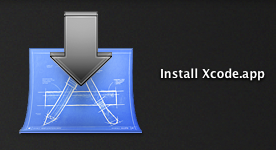
Buying from the App Store in this case doesn't seem to manage anything except Apple taking my $5 bucks, which was never a problem before because it was free. But wait, it gets worse.

Install Xcode.app

So I run this installer app — this Install Xcode.app — and it's going okay. The inteface has the new Lion-style buttons and animations, which is at least entertaining, as well as usual stuff, license agreements and the like. Oddly, it even discovers my old install and tells me that it's going to rename it — not upgrade it, rename it — to Developer-old. No choice here, that's just what it's going to do, just so ya know.
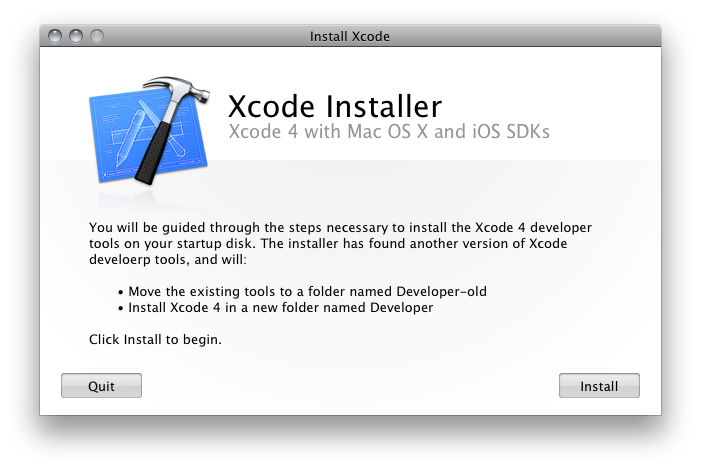
But then it fails, and not exactly gracefully. No, it fails ugly.
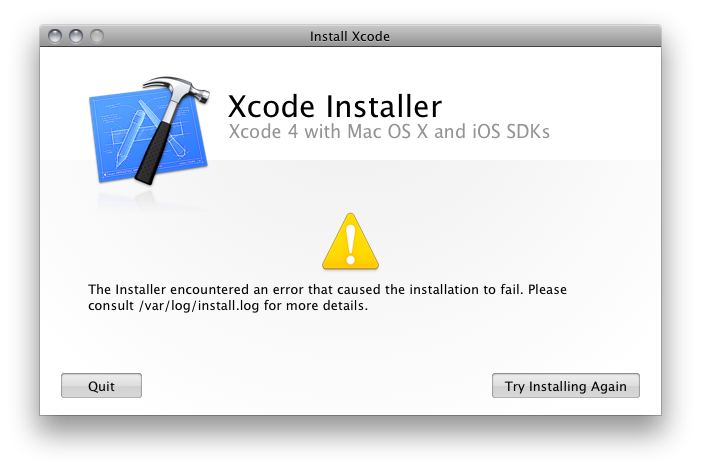
Um… What now? Consult /var/log huh? This is what I paid $5 bucks for? This is what you wrote an installer app for? Crappy error reporting? So you could tell me to "consult /var/log/install.log"? Not even open Console, but consult a log file in an invisible folder? Really? You think Joe Average App Store User will have any freaking idea what this means?

And isn't this just the sort of thing the App Store is supposed to prevent?

Wherefore Failure?

So I open the lo file and this is what it says:

Mar 10 15:02:38 hassium runner[557]: Administrator authorization granted.

Mar 10 15:02:39 hassium installer[541]: Will use PK session

Mar 10 15:02:39 hassium installer[541]: Starting installation:

Mar 10 15:02:39 hassium installer[541]: Configuring volume "SysApps"

Mar 10 15:02:39 hassium installer[541]: Preparing disk for local booted install.

Mar 10 15:02:39 hassium installer[541]: Free space on "SysApps": 8.51 GB (8505917440 bytes).

Mar 10 15:02:39 hassium installer[541]: Create temporary directory "/var/folders/zz/zzzivhrRnAmviuee+++++++++++/-Tmp-//Install.541PaUH12"

Mar 10 15:02:39 hassium installer[541]: IFPKInstallElement (40 packages)

Mar 10 15:02:39 hassium installer[541]: Failed install preflight: Error Domain=NSCocoaErrorDomain Code=640 UserInfo=0x103555a90 "You can’t save the file “Developer” because the volume “SysApps” is out of space."

Mar 10 15:02:39 hassium installer[541]: Install failed: The Installer encountered an error that caused the installation to fail. Contact the software manufacturer for assistance.

Yup, you guessed it. Out of disk space. Now, there's a whole list of fucked-up here, so let me just take you through it.

  1. The Xcode Installer application failed because of a lack of disk space, but somehow can't just say that.
  2. The traditional, old-style (and, ahem, free) installers will simply check disk space during preflight and tell you if you don't have enough space right there in the installer, but this custom app that I paid for cannot.
  3. Nowhere on the App Store does it say that you will need 15 GBs — yes, fifteen or more gigabytes, if you count the Install Xcode app and it's payload — of free disk space to install Xcode.
  4. The Install Xcode app itself is 4.5 GBs, which is a big part of the reason my disk is too full now for the install to complete.
  5. The traditional, old-style Xcode installer always used to offer customization options so you could preen certain Developer resources from the install to conserve space. Not everyone is an iPhone developer, for instance, and not installing the iOS SDK will actually save upwards of 8 GBs of disk space. But these options are no longer present in the custom-built Install Xcode app.

The fact is, there are at least a couple points at which this problem can and should have been detected. The most logical place would be at the app store itself — preferably before I ponied up the dough — where a simple declaration of disk space requirements would be exceptionally useful, particularly for an app and installer that together take up over 15 GBs of disk space. Instead we get this, which, if anything, seems to suggest that all you'll need is 4.24 GBs of space.
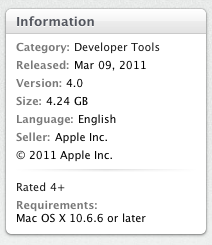
It also would be lovely if the Install Xcode app could tell me all the same useful stuff as a regular installer. But then they'd have to charge $10 bucks, and who's going to pay that for something they used to get for free.

The Fix

After all this I decided to see what was inside this Install Xcode app. I presumed that there would likely be a standard PKG or MPKG file that would allow me to install Xcode in the usual manner. Sure enough, that turned out to be the case.
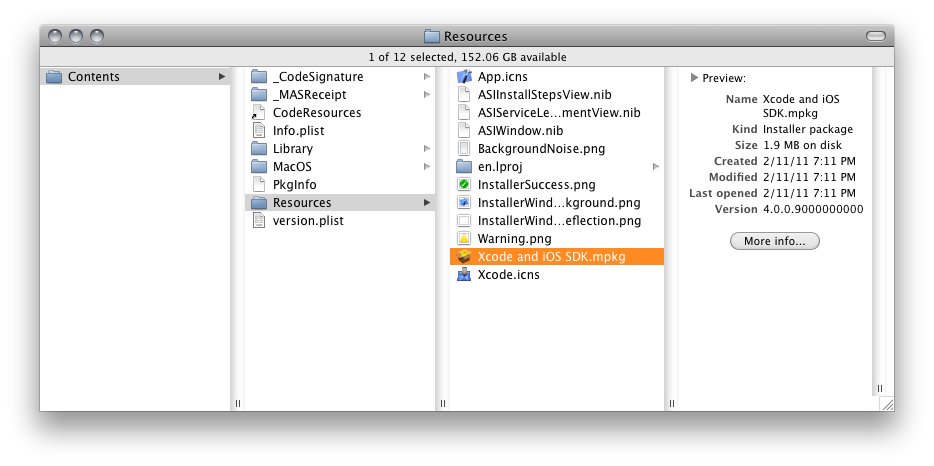
Running that MPKG file, by the way, did, in fact, allow my to customize my install, had I wanted to go that route. (Though I would point out, it did not seem to want to upgrade my existing components as past installations of Xcode had. Take that info for what it's worth.)

Instead, however, I decided to see things through with the Install Xcode app. So I copied it to another drive partition and erased it from my /Applications folder, which freed up enough disk space to complete the full install and ran the Install Xcode app from the secondary partition (happily, the Mac App Store still recognizes that I have installed Xcode on this system).
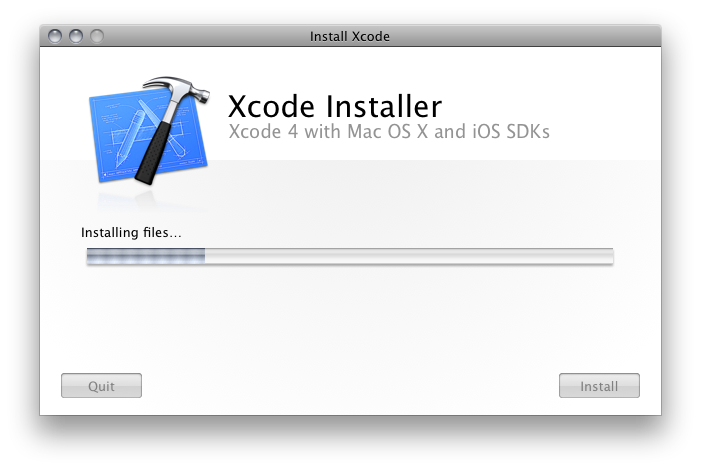
This time, success.
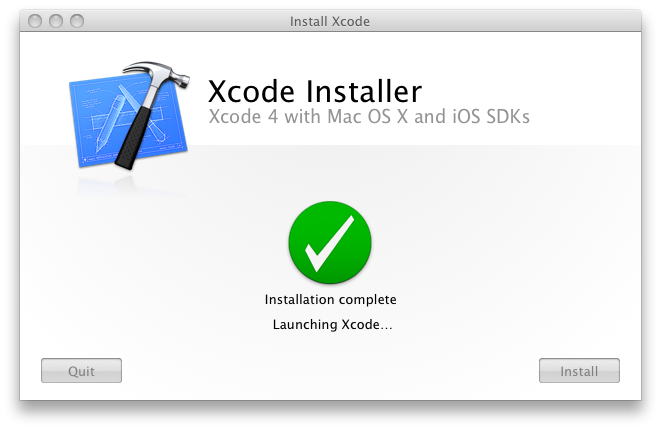
Finally!

Conclusion

So that's my tale. In the case of Xcode, it seems clear to me that the only thing the App Store is really facilitating is payment, which was never an issue in the past because Xcode was blissfully free. Unfortunately, the overall experience of installing Xcode from the Mac App Store is more opaque and, if there is any sort of problem, far more difficult to fix. Given the lack of information provided by the App Store, it also seems far more likely that you will run into problems.

My conclusion: The Mac App Store is simply not well suited for complex application installs. It works great for drag-n-drop apps — self-contained applications that can simply be dropped into /Applications (or anywhere else for that matter). But for complex suites of applications, the Mac App Store doesn't simplify, it complicates. And that ain't right.

Finally, I don't mind that Apple is charging a small fee for the Dev tools. I always thought it was pretty generous that they were free in the past, and $5 is still cheap enough to grab them casually. What I don't particularly care for is paying five dollars for a singularly crappy installation experience. Those two things just don't mix well.

UPDATE:

For folks just joining us in this saga, please note that there are some additional installments dealing with the recent Xcode updates, how they're handled by App Store, and how to deal with them on space-constrained drives. Installment 2 deals with some general App Store issues I had. Installment 3 deals with the 4.0.5 update, which was the smoothest — though by no means perfect — so far.

Also, one reader points out that he was able to keep his file size down but still have success with updates by simply removing the .PKG files (found inside the .MPKG mentioned above) from  Install Xcode.app. He also points out a very cool trick that will allow you stop an in-progress update: simply option-click the INSTALL/UPGRADE button and App Store will give you the option to cancel the update. Handy!
The End Of IT?

It's rare that I see a blog post with comments that are consistently smarter and more well-informed than the post itself. But, folks, we have a winner. This article by 37Signals' "David" is just such a mythical beast. It's so infuriatingly bad, so completely misinformed, and so utterly borne of ignorance and frustration, that I think I'll just go through bit by bit and explain why people should just stop posting this utter nonsense. (And, Gruber, shame on you for thinking there was anything even resembling a well-reasoned argument here.)

David begins his rousing critique of the IT industry thusly:

"When people talk about their IT departments, they always talk about the things they’re not allowed to do, the applications they can’t run, and the long time it takes to get anything done. Rigid and inflexible policies that fill the air with animosity. Not to mention the frustrations of speaking different languages. None of this is a good foundation for a sustainable relationship."

True enough. This is often what people talk about when they talk about IT. They rarely talk about how awesome it is that they have a usable network or rooms full of computers without viruses. But let's continue.

"If businesses had as many gripes with an external vendor, that vendor would’ve been dropped long ago. But IT departments have endured as a necessary evil. I think those days are coming to an end."

Typically, businesses don't have gripes with IT, end-users do. But, okay, I'm curious to hear your reasoning.

"The problem with IT departments seems to be that they’re set up as a forced internal vendor. From the start, they have a monopoly on the 'computer problem' – such monopolies have a tendency to produce the customer service you’d expect from the US Postal Service. The IT department has all the power, they’re not going anywhere (at least not in the short term), and their customers are seen as mindless peons. There’s no feedback loop for improvement."

I don't think that that's really the problem with IT departments at all. The problem is that many IT departments make crappy policy decisions that are user-hostile. But that's not because they have "all the power." In fact those decisions are often, I'd suspect, borne out of a need to satisfy certain technical goals using limited resources. The characterization that IT departments see their customers "as mindless peons" is offensive to anyone who works in this business, and generalizations such as these do as much to "fill the air with animosity" as any IT policy does. Clearly, the flip-side of "the problem" is an almost willful ignorance on the part of certain members of the tech biz — David, I'm looking at you — to make even the slightest effort to understand what IT departments do before making grand proclamations on the internet about the "end of IT." While I do agree that there should be better avenues for feedback, that doesn't mean I can always get what I want. And crying about it is a five-year-old's tactic.

"Obviously, I can see the other side of the fence as well. IT departments are usually treated as a cost center, just above mail delivery and food service in the corporate pecking order, and never win anything when shit just works, but face the wrath of everyone when THE EXCHANGE SERVER IS DOWN!!!!!"

You're goddamned right about that. I suspect that a well-respected, well-treated IT department would have warmer, fuzzier feelings for its "customers." But the fact is that, because people like David continue to see IT departments simply as "cost centers" and not as members of a single team with a shared goal, IT departments continue to be reviled, often by members of the very corporate structures upon which they depend. Unfortunately, this relationship has been sustainable for over twenty years. Probably because, in many institutions, it is a relationship that, though pathalogical in many ways, is necessary.

"At the same time, IT job security is often dependent on making things hard, slow, and complex. If the Exchange Server didn’t require two people to babysit it at all times, that would mean two friends out of work. Of course using hosted Gmail is a bad idea! It’s the same forces and mechanics that slowly turned unions from a force of progress (proper working conditions for all!) to a force of stagnation (only Jack can move the conference chairs, Joe is the only guy who can fix the microphone)."

No, IT job security is not "dependent on making things hard, slow, and complex." I'm so tired of hearing that. It's simply not true, and I'd love to hear a concrete, real-world example of some place where that was the case. The fact of the matter is, IT job security is dependent on making things work. Period. If you really think that the IT department uses Exchange Server so that their buddies can get a job, you simply don't have a clue what IT does.

"But change is coming. Dealing with technology has gone from something only for the techy geeks to something more mainstream. Younger generations get it. Computer savvyness is no longer just for the geek squad."

Change may be coming. Indeed, I hope it is, because I would love to see the relationship between IT and the end-user improved upon, and, where possible, lessened or even ended. And certainly "dealing with technology" is something everyone has to do these days, but after working in tech education for eleven years, I see no evidence that people have gotten any tech-saavier at all. In fact, from one year to the next, people seem to be pretty much the same: they're either tech-saavy or they're not. It has less to do with exposure, more to do with personality. Some people can sing, some people can't. Making the bad singers listen to music all day doesn't make them good singers.

"You no longer need a tech person at the office to man 'the server room.' Responsibility for keeping the servers running has shifted away from the centralized IT department. Today you can get just about all the services that previously required local expertise from a web site somewhere."

Apparently, David, you seem to think that all IT does is run servers, which you seem to think requires them to stand next to them inside a server closet somewhere. Hate to break it to you, buddy, but IT does way more than run your shitty-ass fucking servers. IT configures your switches; they deploy your workstations to your labs; they build and maintain your render clusters, your RAIDs your SANs; they provide all your network infrastructure and keep your workstations virus- and botnet-free. And they usually do it from some sunless underground cavern because idiots like you fail to see their importance. You cannot get any of those things from a website.

"The transition won’t happen over night, but it’s long since begun. The companies who feel they can do without an official IT department are growing in number and size. It’s entirely possible to run a 20-man office without ever even considering the need for a computer called “server” somewhere."

Again, your obsession with servers. And again, I'd love to see some numbers on this. But okay, let's assume for a minute that you're right. What you're basically saying is that there are a lot more smaller companies forming on a regular basis out there. And, sure, smaller companies don't need an IT department. But smaller companies never needed an IT department. Smaller companies could always outsource their technology needs. That's not new. That's not change. That's just more proof that you don't know the first thing about what IT departments are or what they do.

"The good news for IT department operators is that they’re not exactly saddled with skills that can’t be used elsewhere. Most auto workers and textile makers would surely envy their impending doom and ask for a swap."

And that's proof that you're a condescending asshole.

Finally, for the straight shit on what IT actually does, John C. Welch says far more than I ever could (as he actually works in IT) and with far fouler language.

UPDATE:

Here's the inimitable Mr. Welch's response to the very same article. See? I told ya so. (Thanks, John Mahlman, for the tip.)

No More H.264

Every time I start thinking about switching to Google's Chrome browser, they go and do something like this. Dropping H.264 support brings them right on par with my current and still favorite browser: Firefox.

Yes, it bugs me that Firefox doesn't support H.264. But if Chrome won't support it either, then that leaves me with Safari as my last best option, and that just won't do.

Much as I've been tempted, it looks doubtful I'll ever switch to Chrome.

UPDATE 1:

For a more detailed look, this superb Ars article.

UPDATE 2:

And an answer to the question, "Who's happy about this?"

Yay!

A tiny Yay! today for the iPhone coming to Verizon. Whether you switch or stay with AT&T, this is good news for iPhone users. We finally have a choice of carriers, and that means competition. And that means that things get better faster.

And so, a tiny Yay!

Calendar Syncing

UPDATE 5/1/11: If you've been having trouble syncing multiple calendars to your iPhone, it's because Google has added an extra step to the process. I've added a bit about Google's new required iPhone sync utility to the Set Up Your iPhone section for folks with multiple calendars. As always, happy syncing!

I keep getting comments asking the best way to set up two-way calendar sharing between multiple computers, and I've finally decided to just write a post that details the process. This is different — and in my opinion, far better — then sharing your calendars via Box.net, as I wrote about long ago. This, in fact, is the real deal. This is good stuff. This is how it's supposed to work. So let's get started.

I thought the easiest thing to do — since it's what I do, it's fairly simple and it works well — would be to walk you through connecting an iPhone and a Mac to a central calendar on Google's servers.

Set Up a Google Calendar

The first thing you'll need is a Google Calendar account. If you have Gmail, chances are you already have a Google Calendar. If not, go set one up now, and be sure there's at least one calendar active in the account.

Set Up iCal

Next you need your Mac, and specifically you need to open iCal.

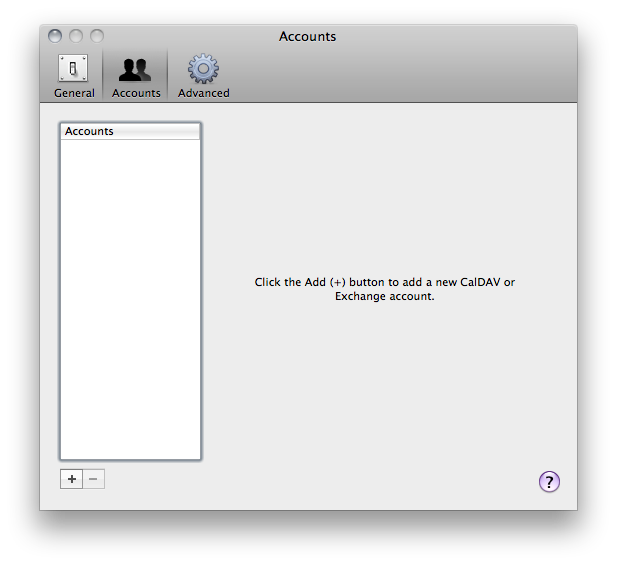
  1. In iCal go to Preferences->Accounts.
  2. Click on the little Plus sign in the lower left corner of the window.

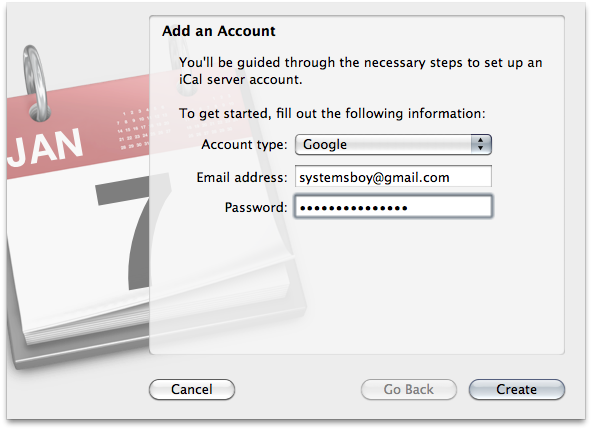
  3. Choose "Google" from the Account Type pulldown and fill in your Google Account info.
  4.  

  5. Once the account is set up you should see Google Calendar's default calendar in your iCal sidebar. If that's your only calendar, you're done. To view a different calendar, or if you have multiple calendars you want to view, go to the Delegates tab and check and/or uncheck which calendars you want to appear in iCal.NOTE: I had to relaunch iCal for it to see all my calendars, which can happen when you have as many as I do — I believe it's eleven!

That's it! Now, any event you create in iCal on one of these Google Calendars will get written to the master calendar on Google Calendar. And vice-versa. Go ahead and test it out. Remember to refresh your browser to register changes made in iCal.

Set Up Your iPhone

You can also connect your iPhone (or iPad) to your Google Calendar account (just like you can with email).

  1. On your iPhone open the Settings app.
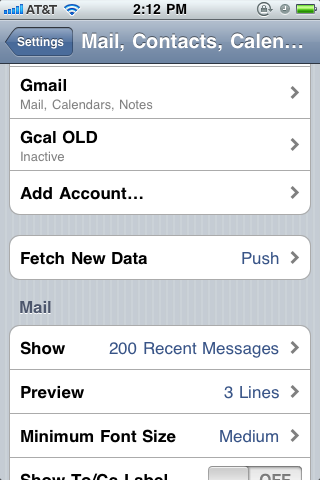
  2. Go to the Mail, Contact, Calendars tab.
  3. Under the Accounts heading press "Add Account..."
  4.  

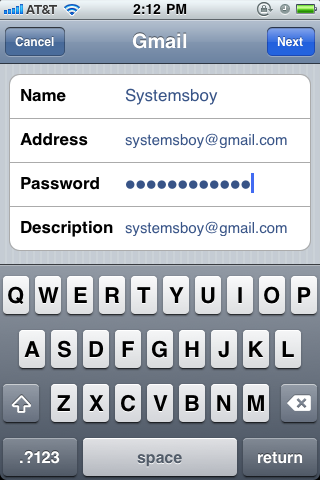
  5. Fill in all your Google Account info, as usual.
  6.  

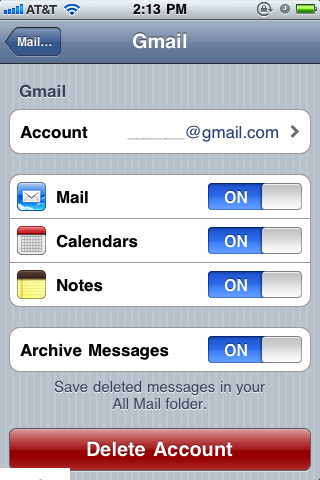
  7. Once the account is set up, press it in the list and be sure that the Calendars switch is set to "ON."
  8.  

  9. Go to your iPhone's iCal application and you should now see your primary Google Calendar.
  10. UPDATE: If you have additional Google Calendars that you want to sync with your iPhone, you'll need to use Google's iPhone configuration utility, which you can reach via any web browser at the following URL (you'll need to be logged in to your Google account first, of course):

    https://www.google.com/calendar/iphoneselect

    At this web page, simply check which calendars you want to sync with your iPhone and they will sync accordingly. As far as I can tell, this is a new additional step that Google has recently added to the process to allow greater control over what gets synced to your iPhone.

Here, just like in iCal, you can add or remove events and they will be reflected on your Google Account. They should also be reflected on your Mac's iCal application as well. Just remember: since this is all happening over the WWW, it can take a few moments to propagate to all systems, especially if you have lots of calendars or a slow connection. Just give it a few minutes and you should see everything get in sync.

Also remember: the Google Calendar is the master calendar. The calendars on your iPhone and Mac are beholden to that Google Calendar. If it goes away from Google, it will be gone from your iPhone as well as from your Mac.

Bonus! Moving iCal Calendars to Google

"Well," you might ask, "what if I've already added a bunch of dates to my local iCal calendar and now I want to migrate to the Google Calendar sharing system without having to redo all my events?" That's a great question.

Fortunately, both iCal and Google Calendar can take advantage of a common calendar format know as ICS. So all you have to do is export your iCal calendar to the ICS format, and then import it into Google Calendar. Sound simple? It is.

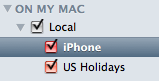
  1. Select a local calendar (under "ON MY MAC") from iCal.
  2.  

  3. Under the File menu select Export...->Export... (no, this is not a typo).
  4. Name the calendar and save it somewhere handy. This is your ICS file, a single file with all that calendar's info, that you can import into Google Calendar.
  5. Open a web browser and go to your Google Calendar account.
  6. Click Settings->Calendar Settings (upper right corner).
  7.  

  8. Click the "Calendars" tab. Here you should see all your calendars listed. Be sure you have a calendar to put all the imported calendar's events into. It can be your main calendar, or you can make a new one. Once you're ready, click Import.
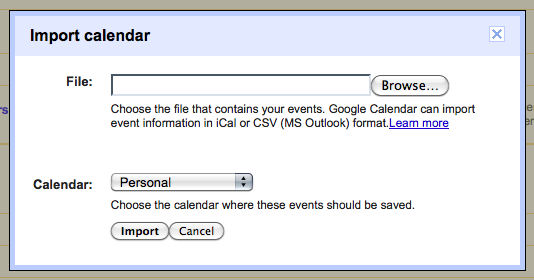
  9. In the popup, select the ICS file you just made, and choose the Google Calendar where you want to put the imported events.
  10.  

  11. Click the Import button.
  12. The calendar events should now be available to you in Google Calendar. You should also see them on your iPhone and in iCal on your Mac. If you don't, and you added them to a new calendar, be sure that new calendar is among your visible Delegates in the Accounts preference pane in iCal.

So that's it! I hope people find this useful. I certainly have!