iBooks Author

I've been poking around a bit with iBooks Author. It's something I find very interesting. See, I've actually been working on a book myself, though maybe not the sort of book you might imagine. It's not a tech book at all. It's actually a comic.

While I'm nowhere near ready to publish, I'm nevertheless understandably interested in digital publishing options. The ePub format is how I've envisioned digitally publishing my book thus far, but iBooks Author offers a whole new wrinkle.

The iBooks Author Format

Like a lot of folks, I was a bit irked when I heard that iBooks Author creates files in a proprietary format only accessible to iOS. It would certainly have been possible for Apple to make iBooks Author create standard ePub formatted content. And that would be nice, but the more I look at the tools, the more I realize that using the ePub format would completely miss the point of this platform. What Apple is trying to do here is change the standard. In the same way they want to revolutionize the world of textbooks, Apple wants to change the way books are made and read. By making them interactive. This is clearly the goal for iBooks Author. Sure, you can make non-interactive books with it, but that misses the point entirely. iBooks Author makes something no other tool can make. And that something is made to run on an iPad.

iBooks Author Beefs

You may note that I said iPad in that last sentence. That was no mistake. From what I can tell, iBooks Author content is not just iOS only, it's iPad only. The Textbook category doesn't even show up in iBooks on the iPhone. Nor can you export from iBooks Author to iPhone. In fact, it's so iPad-centric that even vertical and horizontal orientation are authored for different appearances and behaviors. That's right, a horizontally held iBooks Author product will appear and behave differently than a vertically help one. The iPhone doesn't do this. This is pure iPad, folks.

There are two reasons I put this in the "Beefs" category. The first is that, well, I don't have an iPad, so I have no real way to play with the full iBooks Authoring process. I hope to have this issue corrected eventually, when I finally do end up getting an iPad. I can tell you, iBooks Author is one more reason to do so, and I can see getting one soon.

The other reason is that, somewhat oddly, portrait mode seems to be geared toward reading text. In this mode, text dominates the page and images and other media are added to the sidebar. Tap one of these sidebar items and you'll see the full-screen version, but this layout does not work well for making comics, which are single images on a vertical page. This may make iBooks Author less than ideal for making traditional comics digitally. (And actually, I should point out, making a traditional e-book from a comic is probably the easiest kind of book you can make.) To further illustrate iBooks Author's landscape-centricity, there's even a setting to disallow vertical orientation. But not the other way around.

But this just underscores the point I'm trying to make about iBooks Author. iBooks Author is not about making traditional books. It's about making something new, something specific to the iPad, a new reading experience entirely. One that's rich and interactive. And that's got me thinking about my book in new ways.

iBooks Author Coolness

What ultimately is cool about iBooks Author is this: If you think about it, it's a lot more than just a textbook creation tool, or even just a book creation tool; it's essentially a media wrapper for building simple interactives for iPad. The confusion comes from the name. iBooks Author creates books, right? But again I say, Apple wants us to re-envision the book. This is a book in name only. And this new book lies somewhere between book and application.

What these "books" remind me of more than anything else are the interactive kiosks we have here at the museum. These interactive screens aim to educate and entertain simultaneously by creating an engaging personal experience. The visitor chooses and interacts with the content. They have a certain level of control and agency not afforded by static displays, nor by straight video. And I believe this approach, when done well, can encourage learning.

Using iBooks Author

iBooks Author is very much in the iWork vein. In fact, using it is very, very similar to using Keynote. Keynote projects — as well as Word docs and Mac OS X Dashboard Widgets, for that matter — can even be embedded right into iBooks Author projects. Essentially, as in Keynote, you have an outline on the left and a viewer in the center where you add and modify text and other media. Perhaps the biggest difference is that you'll be authoring in iBooks Author for both vertical and horizontal views. But otherwise, it's very similar.

Conclusion

I have high hopes for iBooks Author. I actually see it as a way to make interactive content that goes far beyond our typical notions of what books are. I suspect  a lot of people will find a lot to like with this tool and the potentially magical things you can create with it with ease and simplicity.

Things I Hate About the Mac App Store

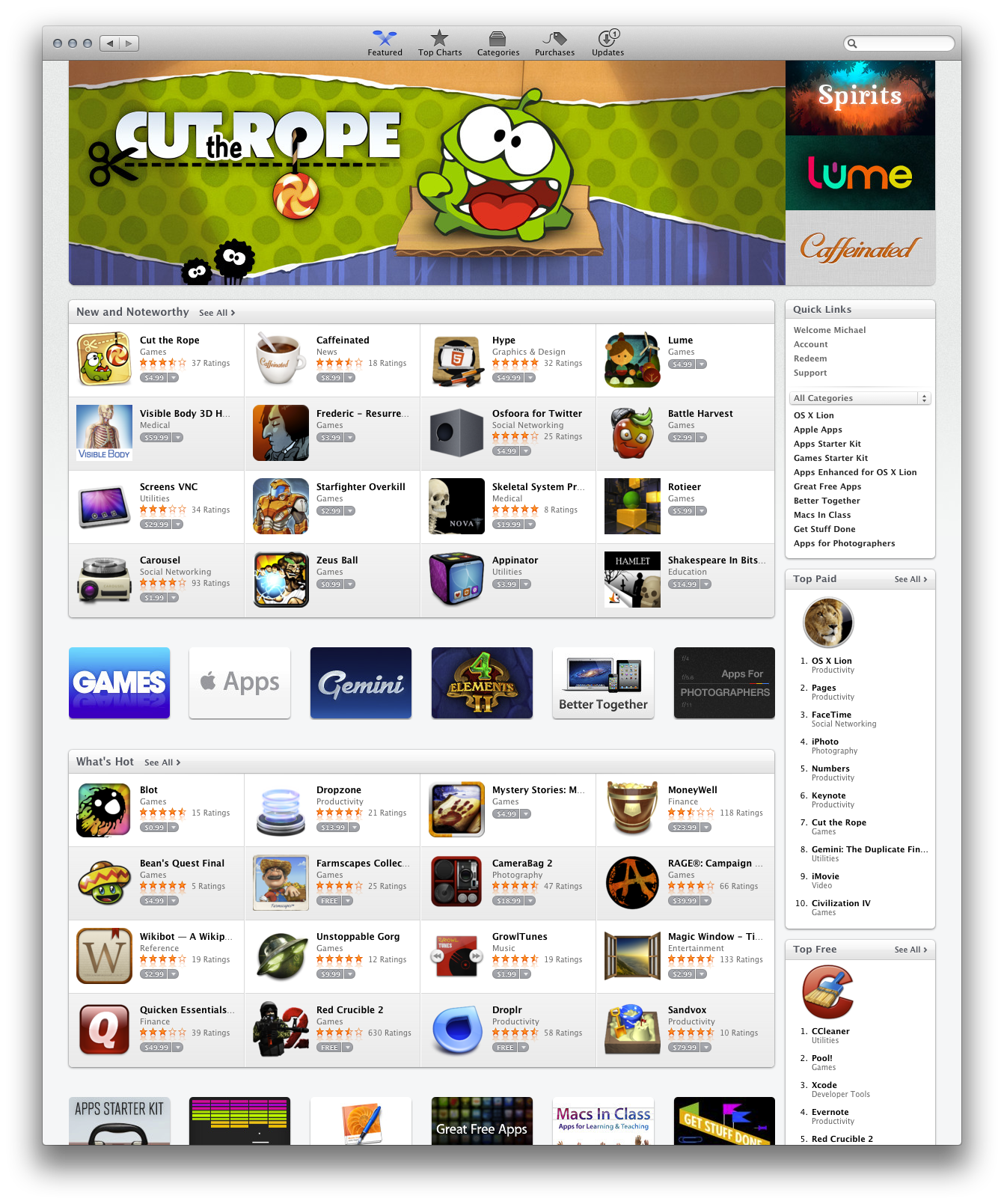
I don't mean to imply with that title — or anything I've written, really — that I think the Mac App Store is all bad. It's not. I like the idea of it quite a bit, and in some cases, particularly that of the Lion upgrade, and also in terms of license handling for individual users, the Mac App Store is quite good. But let's be honest: as a piece of software it's half-baked. It doesn't even seem like a finished application, never mind a system service that will handle core functionality like system software updates. It's sub-iTunes, and that's pretty sub if you ask me. So what are some specfic things I hate?

Unresponsiveness

Launch the Mac App Store and be prepared to wait. Wait while the app loads. Click on a link in the Mac App Store and be prepared to wait some more while whatever you clicked loads. Search for something in the App Store and... Well, you get the idea. I typically wait anywhere from 3 to 10 — you heard me, 10! — seconds for the App Store to fully load on launch. On a new MacBook Pro with 8 Gigs of RAM, no less.

Uncommunicativeness

Not only will you wait after clicking a link, but there will be almost no indication that you've done anything at all. That's right, during the wait time between clicking something and something actually happening, there will be very little to tell you that you've actually initiated an action. The only hint is a small throbber in the toolbar, and it doesn't even always work.

Forgetfulness

Quit the Mac App Store and the next time you launch it it will not return you to your last visited page. No, instead you will see the Featured page, every time, even though Lion is supposed to remember the last state of apps, and even though App Store is a Mac app. This is not only annoying, it's not conducive to shopping.

Unhelpfulness

The Mac App Store in general, in fact, doesn't seem particularly conducive to anything but the most cursory and shallow of shopping endeavors. There is no way to look at more then one item at a time. There is no way to see a list of recently viewed items. There is no way to keep a list of items I'm interested in for perusal and possible purchase later. This is a piece of software that behaves very much like a browser, and, I believe, is even based on WebKit, but has no history or bookmarks. See something you like? Want to save it for later so you can shop around a bit or do some comparison shopping? Better get out a pen and some paper, 'cause this computerized shopping program can't even make wish lists.

Unintentional Humor

I guess the final irony for me is this: How do you expect to sell software with such a shitty piece of software? That just seems like bad salesmanship.

Mountain Lion Sneak Peek

I'm always excited to hear about new OS releases for the Mac. But that excitement is increasingly mixed with trepidation, and the Mountian Lion sneak peek is no exception.


Concerns

Count me among the "Pro" users who fear that the Mac and its OS are quite possibly headed towards an iOS-ification that would relegate lots of the professional functionality we've come to rely on to the dung heap. That's what happened with Final Cut Pro X, it seems to be where the Mac Pro is headed, and I, along with some of my colleagues, worry that that's where Mac OS X (now called, simply — and some might say, ominously — OS X) is headed. Take one look at the latest AirPort Utility — the most blatant example I've seen where Apple has actually removed key features from an app to make it simpler and more iOS-like — and you'll see what I'm talking about. Maybe you'll even start to get worried yourself.

Lion has had its fair share of clues that Apple is headed towards simplification in the OS and is becoming increasingly unconcerned with professional users. Some of the new features are great, or at least could be some day. I think the versioning system, while still problematic, could someday be transformative if a good deal of thought and effort are put into improving the UX. But little things, like the hiding of the user's Library folder, hint at more totalitarian possibilities, ones which lock the user out of the OS to an unprecedented degree. The suggestion that Apple might someday get rid of filesystem access in the desktop OS sends shivers up my spine, but I do consider it a very real possibility. Personally, I don't think this will happen any day soon. But some of my colleagues are less optimistic.

So it is against this backdrop of thought that I consider Mountain Lion.

The Worrisome

As with Lion, we see in Mountain Lion the iOS trend continue. This, in and of itself, might be cause for concern. iOS presents the OS in a simpler, more restrictive way, and more iOS on the desktop could be a sign of greater restrictiveness.

It's certainly worth noting that Software Update will be gone in Mountain Lion, replaced wholly by the Mac App Store. I suspect that this means it will be even harder to save archives of application and OS updates, if we'll even have the ability at all. And if you read this blog with any regularity you have a pretty good sense of how I feel about the Mac App Store in general (hint: it's not good). I suppose if you like iTunes, you'll be tickled pink that App Store will soon be handling core OS functions. But then, if you like iTunes, there is something seriously wrong with your brain.

I'm also a bit perturbed by the fact that X11 — the engine that powers numerous open source software projects, including GIMP and many of the OpenOffice ports — will no longer be included as part of the default install of the OS. It is still being developed and supported and will still be available, for now, from Apple, but as a separate download under the guise of XQuartz. Not a huge problem, per se, but, it could be argued, a sign of things to come.

Finally, it might also be of some concern that this year, for the first time ever, Apple decided not to announce this update with a big event. This year, instead, Apple chose to make the announcement quietly, to a select group of press members. It's almost eerie, the lack of fanfare.

The Promising

For the most part, however, Mountain Lion seems to be less about restrictions as it is about bringing iOS features to the Mac. Less about limitations and more about integration. And that's at least somewhat reassuring.

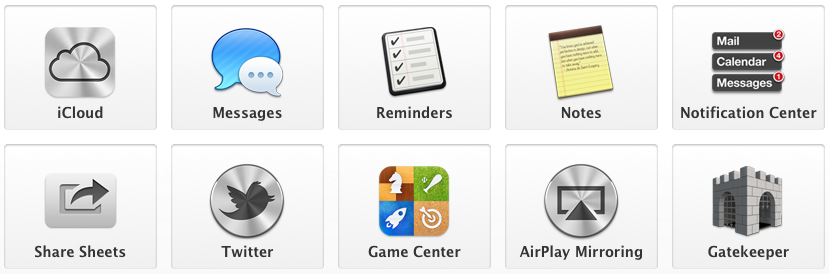
So mainly what we're seeing in Mountain Lion is the addition of numerous applications and interface trends brought over from iOS to OS X. Messages, Notes, Notification Center, Share Sheets, Game Center and AirPlay Mirroring are all applications or features that are being brought to the Mac desktop from iOS. As a Mac user, this is the kind of cross-pollination I want to see. A cool feature developed for iOS making it into OS X just makes good sense. The fact that Apple is doing this is yet another sign that perhaps they haven't completely given up on the desktop market.

I also think it's very promising that Apple has decided to begin refocusing efforts on the desktop with a commitment to yearly OS X updates. Sure, if the direction they take is bad, this could be a huge negative, I suppose, but at least they aren't letting the desktop languish; they see potential in the desktop market, and are developing for it. I take this as a positive sign.

Also, Gatekeeper, Apple's approach to application security, hits, I think, the right note. Its default mode, which requires all apps to be digitally signed, is perfect for mainstream users. But Apple has given pro users ultimate control and freedom by giving them the option to bypass Gate Keeper. To me, that's just the right balance between security and freedom. In fact, if Apple ever does choose the route of a hidden filesystem, I hope they do something like this, allowing pro users to see and access it easily, with a simple preference.

Final Thoughts

From what I've seen so far, Mountain Lion looks promising. I'm seeing less of the iOS restrictions hitting the desktop OS than I'd anticipated, and instead what looks to be happening is that a lot of iOS-only features are now getting integrated into OS X. I take this trend as a generally positive sign. So I remain hopeful.

If Apple follows a policy of integration and eschews the limitations of iOS on the desktop, I'll remain a happy Apple customer. I hope that's what they do.

Airport Extreme

This year for Xmas I asked for and received an Airport Extreme. Some of you may recall my struggles with the numerous Airport Expresses I own. This is because of the way my home network has evolved over the years, which is to say, completely piecemeal and haphazardly.

A Piecemeal Network

My home network, like many, started simply with a wired router. It then progressed to wireless with my first Airport Express, which, at the time was plenty for me, living alone in my small studio apartment. My next apartment, however, was a duplex, so I extended my network with an additional Airport Express, one capable of 802.11n. Then, as wireless networks in the city exploded and frequencies grew more congested, causing problems with the wireless Netflix streaming I started doing a good deal of, I added yet another Airport Express and built out my network, creating one 5GHz network for my heaviest use-cases, and a 2.4GHz network for my phones and gadgets.

When all was said and done I had a wired router feeding three Airport Expresses, two of which were supplying wireless on 5GHz and one of which provided separate wireless access on the 2.4GHz frequency. It was a total mess: it took forever to set up (like when we recently moved to a new house); it broke often and was horrible to troubleshoot.

Cut To The Present Day

So this year one of my presents was an Airport Extreme. I just wanted to simplify everything. I suppose I could've gotten some LinkSys dealio that would've been faster, but frankly, this is about laziness, and the Airport Extreme is, for me, the easiest option available, if for no other reason than the fact that I already use and am quite familiar with the Airport ecosystem.

And easy it was! In fact, I was able to set it up and completely replace my existing network — a router and three Airport Expresses — in about ten minutes. That's right, what used to take me hours to set up and get working just so took ten minutes with an Airport Extreme. And now, all those boxes are gone, replaced with a single — and quite attractive, I might add — wireless router. It's fantastic!

I have to say, setting up my Airport Extreme was one of the best user experiences I've had in a very, very long time. I'm not used to calling network setup easy, but that's exactly what it was. I entered my settings and it simply Just Worked.

Clearly a lot has changed since I first began building my home network. It's nice to finally be using some current gear, and the Airport Extreme is a great box. Super simple to set up and use. Oh, and it's fast too!

If you're looking to upgrade an aging wireless network, want simplicity and ease-of-use, and don't need a ton of tweakable settings, I highly recommend the Airport Extreme.