Sticking it to Sprint

Apparently, Sprint's not doing so well. Apparently they're having customer retention problems. That means that people would rather go to the hassle of changing phone service providers than continue giving their money to Sprint. While it wasn't my number one reason for switching, I can say from personal experience that Sprint's horrendous customer service was the thing that pushed me over the edge into iPhone-land and the loving arms of AT&T. AT&T might not be perfect, and I can understand why a lot of people are unhappy with them, but they still kick Sprint's ass when it comes to customer service.

I will never go back to Sprint; they have lost me forever as a customer. But if they want to hold onto the ones they have, one thing they might try, for starters, is not treating them like shit.

Just a thought.

Final Cut Studio 3

Apple has just released the latest version of the Final Cut Studio, for which, technically, there is no version number. But it's the third one, so for clarity (remember clarity?) we're calling it "Final Cut Studio 3."

In this latest version, LiveType has disappeared and appears to now be completely integrated into Motion. Compressor now has image sequence support, blessedly, and Blu-Ray disc burning support, including basic menu creation. DVD Studio Pro sees no changes; it's version number remains the same, prompting me to wonder about its fate.

FCP

But I'm most curious to see what the new version of Final Cut Pro has to offer. They appear to really be focusing on leveraging the new family of ProRes CODECs, which is great. Also great, Final Cut 7 can export in the background (finally!), which means you won't have to offload your exports to Quicktime anymore if you want to continue editing. And if the app's gotten any faster or more stable, that would be fantastic.

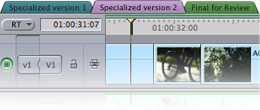
But what else? The other features I've read about seem entirely ho-hum. I mean, colored tabs? Nice, I guess. But it hardly seems like the sort of radical rethinking a la iMovie I was really hoping for after a two year wait.

After Two Years: Colored Tabs, Ladies and Gents!

If FCS's prominence — or lack thereof — on Apple's front page is any indication, rethinking this package is not a priority. Rather, maintaining the status quo would appear to be. Final Cut seems to have somehow moved from flagship to mainstay.

promo-finalcutstudio-20090722

I'll wait to pass final judgment. But I'm prepared to be underwhelmed.

Apple Tablet? Really?

If this is what the rumored Apple tablet is going to be — basically a bigger version of the iPod Touch — then I'll pass. I mean, really, what's the point of a device like this? It's too big to be an iPod or an extremely mobile computing device like the iPhone, and I already have an iPhone anyway. Yet it's too small and underpowered to be useful in the ways a laptop is useful, as a real computer that just happens to be portable. In fact, the only niche I see a device like this filling is the netbook niche, which Apple has already eschewed, and which I agree will prove to be a flash in the pan, a fad. I guess it's possible they could be going for gamers, but that seems unlikely to me. The Apple tablet that I'm hearing about sounds like a netbook with a touchscreen, which, frankly, just isn't compelling in the least.

Apple Tablet? No Thanks! (image: AppleInsider)

Besides, I thought the advantage of tablet computers was that you could draw on them. I thought they were for artists. This thing doesn't look like you're meant to use it that way at all. And isn't the whole reason Apple went with a virtual keyboard on the iPhone because of the small size of the device, to conserve space? What would be the purpose on a larger device?

I realize all is speculation at this point, and maybe I'm missing something about this thing that isn't obvious because the device hasn't even been announced. I mean, who knows, maybe it's something completely revolutionary, like nothing we've ever seen before, with fabulous, new untold uses and capabilities. Or, hell, maybe you can draw on it. That would be great.

But if this thing's for real and it's anything like the rumors say it is, I'm amazed anyone's excited about it at all. It sounds like a computer without a purpose.

Oh, and one more thing: when it comes out they should call it the Ablet. Right? Don't you think?

Totally.

iPhone 3GS Bugaboos

Yeah, my iPhone 3GS has been actin' funny, and I don't know why. I really don't. And as a SysAdmin I find the lack of real troubleshooting tools very frustrating.

About the best I can do here is to report my findings. So here are some of the things my iPhone 3GS has started doing.

Network Confusion

The iPhone seems to get confused when presented with too many network options if one of those options doesn't perform as expected. Case in point: I have an extended WiFi network at home, and the iPhone, of course, always opts to use it when I'm home. Signal strength is usually great here, so the iPhone just chugs along. But recently my wireless had some problems and, though the signal was good in some places, it was spotty in others, and in places it would fail to get on the Internet. Turns out one of the Airport Express remotes was having problems, allowing the phone to reach the Airport, but not necessarily get connected.

When something like this happens the iPhone does not gracefully switch over to 3G. Instead it tries endlessly to use the broken WiFi connection. This in turn quickly wears down the battery, as WiFi access is pretty battery intensive.

Personally, I think it would be great if the phone could be a little smarter than that, and if it can't get Internet on a WiFi connection it can see, pop up an alert and ask you if you want to switch to 3G or Edge.

Instead, the iPhone spends all day killing its own battery on a connection that's busted. We have a term for that in the industry: sucky.

Can't Wake; Heats Up; Shuts Down

On occasion I find myself unable to wake the phone. This often happens if I leave the camera running and put the phone to sleep. My guess is that sleep can hang (just like on the full-sized Mac OS) when there are power hungry processes running. It's not a huge deal, though it does require a force reboot, and it is becoming more and more worrisome. The other day this happened, only this time the phone had gotten very hot. After trying a few times to wake it up in the usual manner, it decided all on its own to reboot. Spooky!

This happened, by the way, soon after I downloaded my first application with push notification capability — Zillow — as did other strangeness.

Needless to say, I've turned off push notifications on the iPhone. I am not convinced they're ready for prime time, frankly.
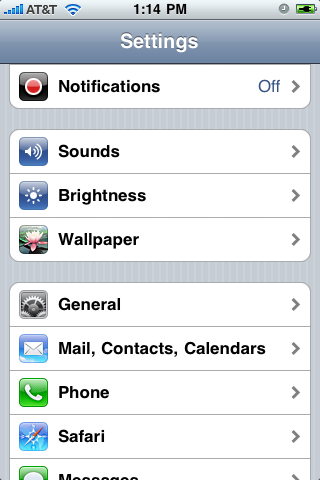
Push Notifications Notification: This Wasn't Here Before

Application Identity Crisis

Another thing that's been happening since downloading Zillow is that, from time to time, my application icons get switched around. Zillow will have the icon for the iHandy Level, or Wild West Pinball will have the icon for Zillow. The only way to fix this seems to be to delete the confused apps from the phone and then re-sync them from my Mac. Sometimes even that doesn't work. Untold fun!
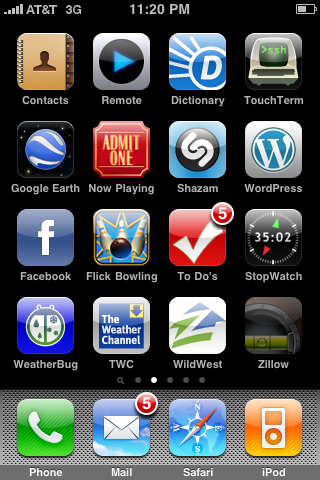
Iconfusion!

More Compass Confusion

I mentioned my troubles using the compass on the subway, but where the compass really comes in handy for me is just off the subway. Walk out of the terminal, and: which way is north? Right. iPhone!

Only the other day I needed to figure out which way was east. And there was no east. Seriously, I'd spin the compass around but it would never show east. Uh, we need east for this to work.

Battery Recharging

Last night was, perhaps, the oddest symptom I'd had yet. I'd left for a river cruise (yes, a river cruise) with a decent battery charge. Probably 70-80 percent, I'd guess. After an admittedly heavy evening of photo and video shooting, the phone suddenly gave me the "I'm almost out of juice" warning, telling me that the battery was at 20 percent. "It's cool iPhone. I understand. You're tired." And I gave it a rest. At some point, though, I just had to grab one more shot. But after doing so, the iPhone rebooted. When it came back up I checked the battery charge percentage. It read 58%.

As my friend pointed out, batteries cannot spontaneously recharge. Something is clearly wiggy with the battery report on the iPhone.

One Last Shot: Empire State vs Chrysler

Bad Power

Since I've gotten my iPhone 3GS the little plug that comes with the thing, the one that connects the phone to a wall jack, only works intermittently. I'll plug it in and my phone will start charging. I unplug it then replug it and the phone won't even register it's plugged into anything. It's really annoying, but since I have other options — in the form of my old iPhone power brick — and a lack of time, I haven't done anything about it. Plus I'm just not looking forward to the conversation with the Apple Genius:

Me: "Uh, yeah, this plug only works some of the time."

Genius: [Plugs phone in] "Seems like it works fine to me."

Me: "Uh, yeah, I know, but in, like, ten minutes, if you unlpug and replug it, nothing."

Genius: [Unplugs and replugs the phone] "Still seems to work. Maybe there's something wrong with your power."

Me: "Yeah, but this has happened in a variety of buildings."

Genius: "It's not happening here."

Me: "It's intermittent. Give it a few minutes."

Genius: "Uh, sure. Okay. NEXT!"
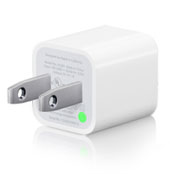
Power Adaptor (Apple)

Conclusion

So what do I think about all this? Well, I think that either the iPhone 3GS or the iPhone OS 3.0 has some power issues, and some sleep issues. I think that the power adaptor included with the iPhone 3GS is crap, and that push notification is very power-hungry, and possibly very flaky when in the wrong hands. I also think that the Zillow application may just be the wrong hands (though it's a pretty cool app, granted). I have just de-installed Zillow and it seems to help with my icon problems at least. Hopefully it will add some much-needed stability to the phone.

Thank heaven I didn't have to remove pinball, though. I'm not sure I could have lived without pinball.

In any case, am I still happy with my iPhone 3GS? Yes, absolutely. But I think I'm getting ready for some bug fixes a la the iPhone OS 3.1 update.


Firefox 3.5 Oddities

I've come across some strange new behaviors in Firefox 3.5. Some, I'm sure, are just the result of bugs or using the beta version for so long, others are likely features. But they're all interesting. So in the interest of sharing I give you these Firefox 3.5 oddities.

Font Request

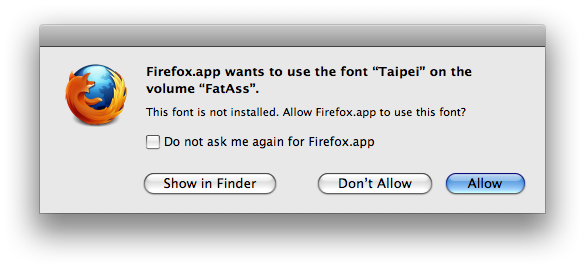
At some point I must've gone to a site that wanted to use some specific fonts, and Firefox now, apparently, has a method for checking a local system for said fonts and using them if they're installed. When this happens, we see this alert:

Font Request

Pretty cool! But maybe a little scary too. I declined until I can read up on this feature. I have no idea what will happen if I allow this, nor who is making the request. Security risk? Anyone?

UPDATE: This happens in Safari too. The site is UPS's United States English section. Oddly, this only seems to happen on some of my computers. Hmmm... This needs investigating...

UPDATE 2: As reader Jay points out, this is likely a function of Font Book's Auto Activation feature. Indeed, unchecking "Automatic font activation" on my home computer does prevent the alert from occurring.

Font Book Preferences

But weirdness abounds. For one, despite the fact that I do not have "Ask me before activating" checked, I am still prompted in Firefox and Safari. In fact, toggling the "Ask me before activating" setting seems to have no effect whatsoever on the appearance of this dialog box. Weirder still, even after installing (but not activating) the Taipei font on my work computer, which should trigger the alert, I can't make it happen on that system. Nothing I do on my work machine causes the prompt.

Borken Bookmarks

Using Firefox 3.5, for the first in I don't know how long, I was struck with the "Firefox In Use" bug. This is the bug where you try to open Firefox and it tells you that there's already a copy running. We used to get this all the time in my old lab, which was very multi-user. I believe my instance was caused by some Fast User Switching on my part. Eventually I got her running, but wound up getting this rather odd alert:

Bookmark System Borken

I'm not sure what the ultimate fix for this was. I believe, after removing the problem ".parentlock" file, a logout and re-login were all that was required. Possibly a reboot. I certainly didn't need to delete any of my Places database files, which was a relief. I did notice a bunch of places.sqlite.corrupt files in my Firefox profile. These I deleted these as they were taking up tons of space — about 4 gigs if memory serves. Weirdness.

Session Embarrassment

My home network recently lost connectivity, and while I was troubleshooting it I, of course, restarted Firefox. But upon reopening, Firefox was, for obvious reasons, unable to recover certain aspects — by which I mean all my windows and tabs — of my session. This resulted in the following, rather detailed and delightful, alert:

It's Because the Network is Down, Silly

Of course there was no "recently opened web page" causing the problem. It was just my lack of connectivity. Might be nice of Firefox to at least remind me of the possibility. Still, this alert has some real class.

So there you have it. Proof that there are some real, live, genuine under-the-hood changes going on in the new Firefox 3.5.

Fun stuff.